Welcome to Responses
A Response is how the Secure60 platform connects to external systems and sources.
Responses can be as simple as an email or could be an HTTP request to an API endpoint to trigger a specific action.
A Response is an Object in the Secure60 platform that is triggered by a Rule
Responses are the “respond” stage of the broader Threat lifecycle. For how scope, severity, and overrides fit alongside the Threats Overview, groups, states, and reporting, see Threat Management.
Where Responses live
Responses belong to an Organisation, not to a Project, and are managed in the Portal under Organisation Settings → Responses.
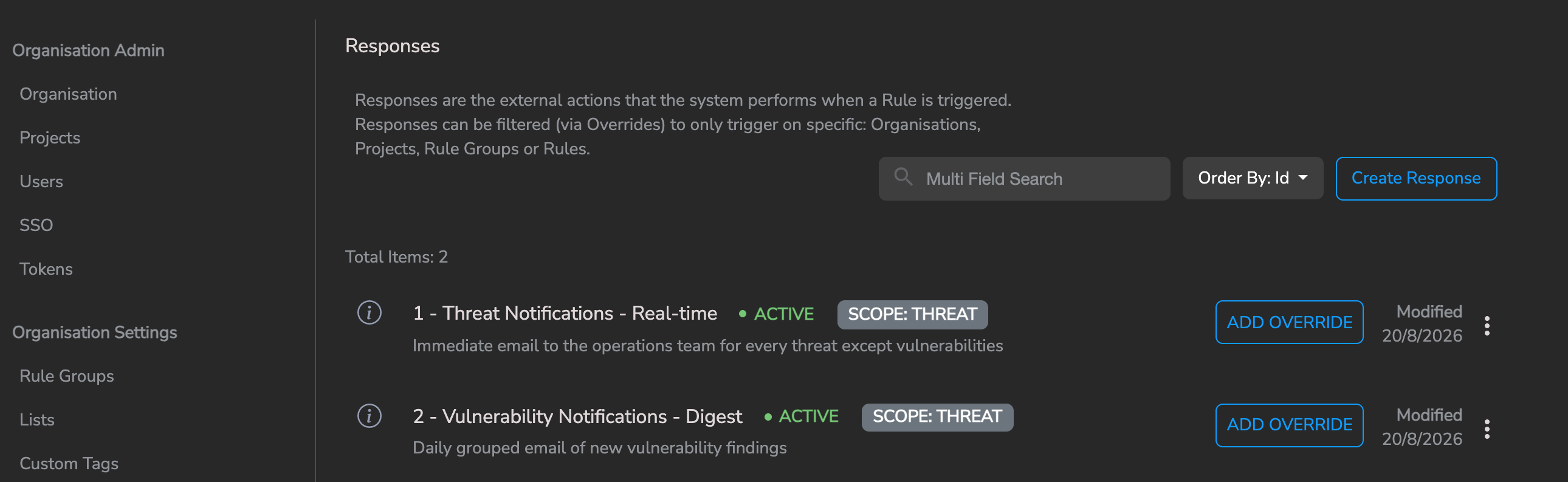
The two responses shown above are the notification baseline — one real-time notification for everything except vulnerabilities, and one daily digest for vulnerabilities. Recommended configuration: avoiding response flooding explains why the split matters, and how to build it on an organisation that doesn’t have it.
New organisations are provisioned with exactly these two Responses, both emailing all organisation users. They are ordinary Responses — rename them, change the recipients, adjust the cadence, or switch off either one.
Organisations created before this became the default have a single Response named Default Response instead, with Scope THREAT and Source Type ALL. It has no source filtering and no stored Send Mode, so once Vulnerability Management is enabled it covers vulnerability findings and rule detections together and delivers everything — including a critical detection — on the next daily digest. Rebuilding it as the two-Response pattern below is worth doing.
Response Types
There are 2 main types of Response action within Secure60
- Email
- Allows you to send an email to a user or group
- Supports two delivery modes: real-time (one email per matching threat) and digest (a single grouped email per recipient on a schedule). See Email Send Mode: Real-time vs Digest below.
- Webhook
- Allows you to connect to any internet facing HTTP endpoint
- This enables a wide range of integration scenarios:
- Slack and other chat platforms
- Firewall APIs - To allow blocking of IPs
- Active Directory and other user systems - To disable users
- Ticketing and Support platforms
Response Scope, Source Type, Severity and Overrides
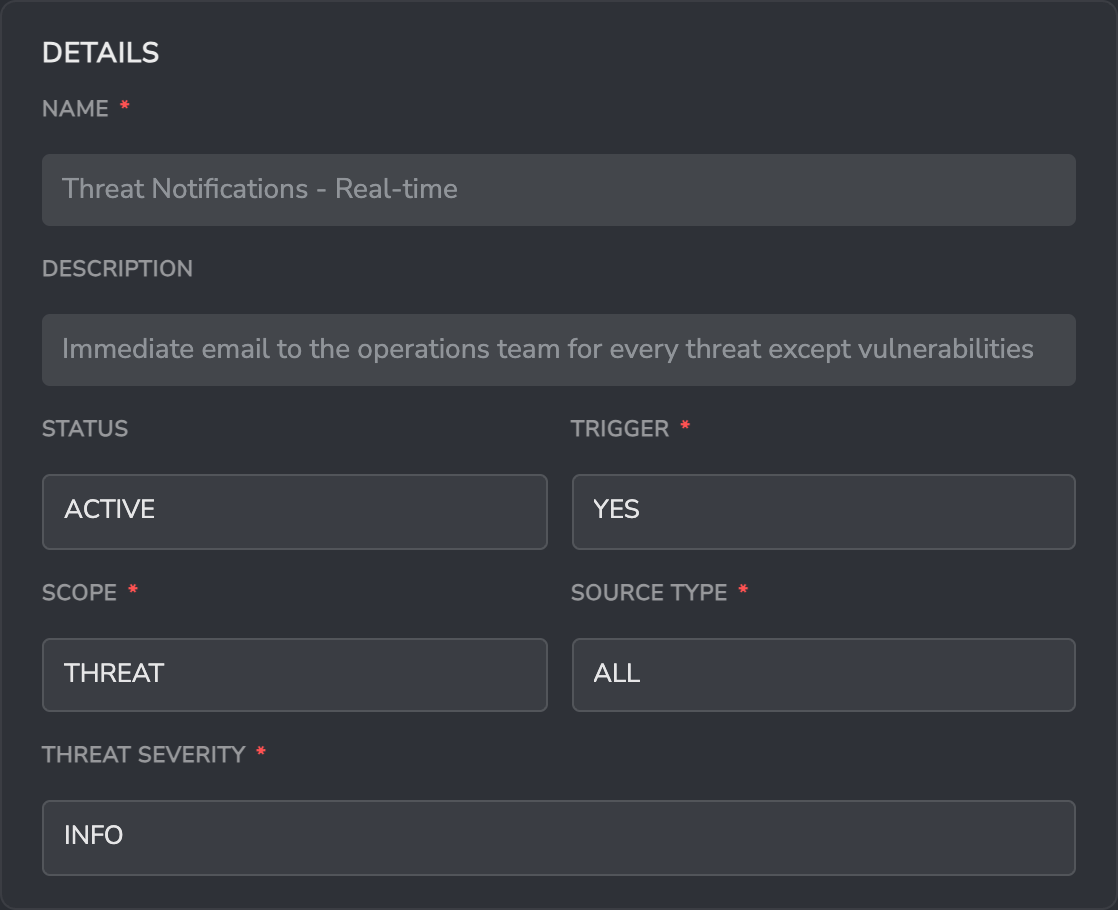
Four fields on the Response itself decide whether it fires. They are evaluated together, and a Response only executes when all of them match.
Scope
scope decides which kind of platform object the Response fires on. Valid values are THREAT, SIGNAL and ALL.
THREAT— fires only when a Rule creates a Threat. This is the right setting for almost every Response, and is the default for new Responses.SIGNAL— fires on Signal creation. Signals are the low-level matches that entity analytics accumulates before they are escalated into a Threat, so they are produced in far greater volume than Threats.ALL— fires on Signals, Threats and internal state changes alike.
Scope ALL is the single most common cause of unexpected email volume. Two things make it worse than it looks:
- Signals are generated continuously by normal analytics activity, not just by noteworthy events.
- Digest batching applies to Threats only. A Signal has no Threat to group under, so a Signal match sends an email immediately, one per Signal, even when the operation’s Send Mode is set to Digest.
Unless you have a specific reason to alert on Signals, set Scope = THREAT.
Source Type
type — labelled Source Type in the Portal — restricts the Response to threats originating from one part of the platform. Valid values are ALL, RULE, THREAT_INTEL and VULNERABILITY.
ALL— every threat, whatever created it (default)RULE— detection rules, entity analytics, AI analyst roles, and anything else that is neither threat intelligence nor vulnerability management (this is the fallback bucket)THREAT_INTEL— threat intelligence matchesVULNERABILITY— Vulnerability Manager package and CVE findings
Source Type is the cleanest way to give vulnerability findings their own notification path, because vulnerability volume is fundamentally different from detection volume.
Severity
A response has a severity (default INFO) which indicates whether the Response should fire based on the Severity level of a Threat.
severity valid values are: INFO, LOW, MEDIUM, HIGH, CRITICAL.
The value is a floor, not an exact match — MEDIUM fires for MEDIUM, HIGH and CRITICAL, and INFO fires for everything. This allows different teams or workflows to handle Threats of varying criticality.
Trigger
trigger is the on/off switch for the Response as a whole. YES means the Response fires when Scope, Source Type and Severity all match. NO means it never fires on its own — which is useful as an “off by default, on for these specific cases” pattern, where Overrides turn it back on for a named Rule or Rule Group.
Overrides
Organisations often need to be more specific about how and when a response should be executed, Common scenarios include:
- Alerting the team of “Linux Admins” when a Rule within a Rule Group called “Linux” triggers
- Triggering a Response whenever a Threat is created EXCEPT if the Rule or Rule Group is a specific item
- Suppressing a Response for one source (such as vulnerabilities) while leaving it active for every other source
- Creating Responses that are active across the full hierarchy of sub organisations
Response Overrides offer a solution to all of these scenarios and more.
Once a Response has been created you may add Overrides to fine tune the execution scenarios. Each Override sets a trigger of YES or NO, and narrows where that decision applies using any combination of Source Type, Rule ID, Rule Group ID, Project ID and Organisation ID.
Example Response Override
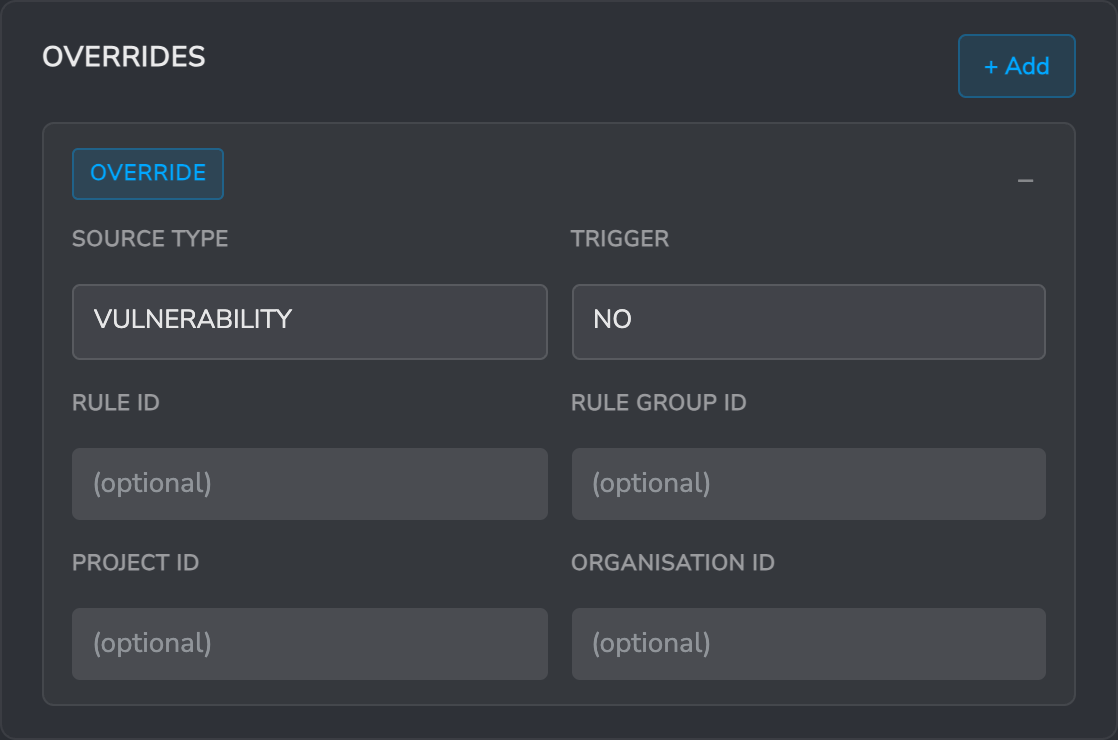
The Override above stops its Response firing for vulnerability findings while leaving it active for every other source.
Override precedence
Only one Override is applied per Response — the most specific one that matches. Specificity runs, from strongest to weakest:
- Rule ID
- Rule Group ID
- Project ID
- Organisation ID
- Source Type
An Override that matches on several of these is stronger than one that matches on a single field, so a Rule ID Override with Trigger: YES will win over a broader Source Type Override with Trigger: NO. Order in the list has no effect.
Recommended configuration: avoiding response flooding
Response flooding is almost always caused by one Response covering both detections and vulnerabilities.
The volumes are not comparable. A detection rule produces a handful of Threats a day. Vulnerability Management produces one Threat per package-CVE pair per host, so the first scan of a fleet can create thousands of Threats in a few minutes — and with a single real-time email Response in place, thousands of emails with it. The same happens whenever a large batch of new hosts is onboarded.
The fix is to split notification into two Responses, so that detections stay immediate and vulnerabilities are batched. New organisations are provisioned this way already; the steps below are for building it on an existing organisation, or for rebuilding it after the Responses have been changed.
Response 1 — real-time notifications for everything except vulnerabilities
Configure the Details as follows:
- Scope:
THREAT - Source Type:
ALL - Threat Severity:
INFO(or raise it toMEDIUM/HIGHif the team only wants escalations) - Trigger:
YES
Add an Email operation with Send Mode: Real-time, so every matching Threat produces its own email.
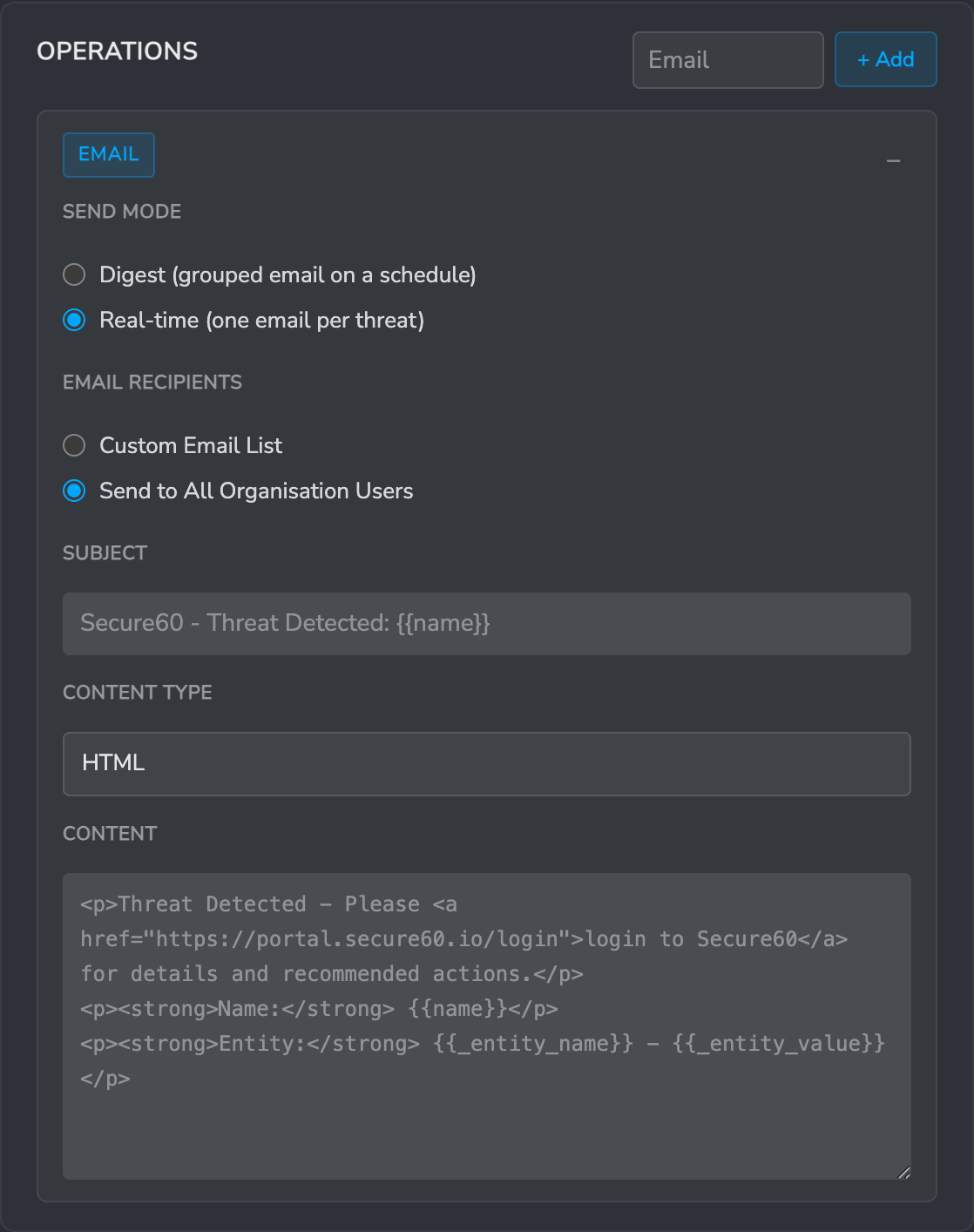
Then add one Override to keep vulnerabilities out of it:
- Source Type:
VULNERABILITY - Trigger:
NO - Leave Rule ID, Rule Group ID, Project ID and Organisation ID blank
The Override only applies to vulnerability threats, so everything else continues to notify in real time.
Use the Override rather than setting Source Type to RULE on this Response. RULE would also exclude threat intelligence matches, whereas the Override excludes vulnerabilities alone.
Response 2 — daily digest for vulnerabilities
Create a second Response for vulnerability findings:
- Scope:
THREAT - Source Type:
VULNERABILITY - Threat Severity:
INFO - Trigger:
YES
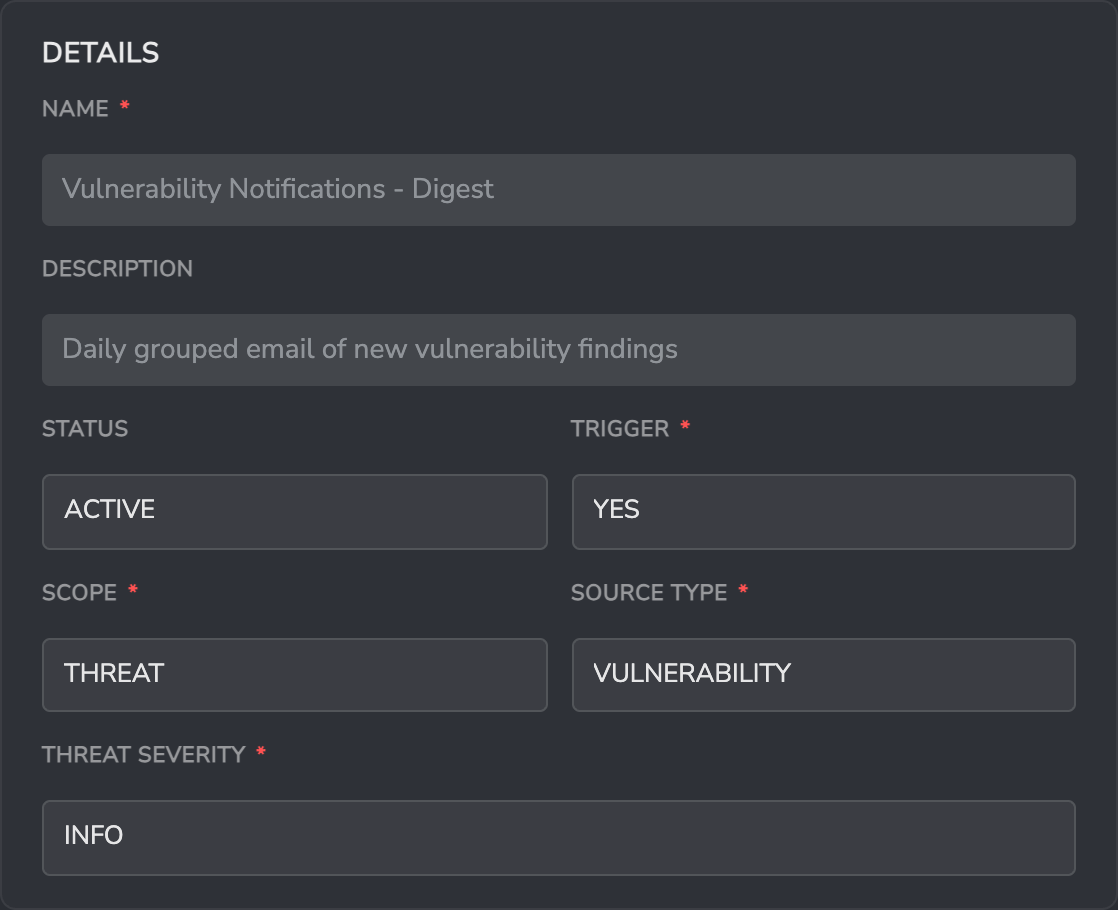
Because Source Type already limits this Response to vulnerabilities, it needs no Overrides. Add an Email operation with Send Mode: Digest, cadence DAILY, and Send immediately for severity ≥ set to NONE.
That produces one grouped email per recipient per day covering every new vulnerability finding, regardless of how many hosts were scanned.
Configuration summary
| Response 1 — Detections | Response 2 — Vulnerabilities | |
|---|---|---|
| Scope | THREAT |
THREAT |
| Source Type | ALL |
VULNERABILITY |
| Threat Severity | INFO |
INFO |
| Send Mode | Real-time | Digest, DAILY |
| Overrides | Source Type VULNERABILITY → Trigger NO |
none |
Things that reintroduce flooding
- Scope set to
ALL. The Response then fires on Signals as well as Threats, and Signal emails are never batched into a digest. Set Scope toTHREAT. - A digest bypass set too low. Send immediately for severity ≥ releases matching findings from the queue as individual real-time emails. On a vulnerability Response,
HIGHcan still mean thousands of emails from one scan. Start atNONE. - A second, older Response still active. Responses are additive — every Response that matches fires. Check the full list under Organisation Settings → Responses, including any legacy Default Response, before assuming the new configuration is the only one running.
- Overrides that are broader than intended. An Override with
Trigger: YESand no narrowing fields applies to everything and can re-enable a Response you meant to suppress.
Response templating
Within the content of every Response we allow templating. This enables the insertion of dynamic content into the Response data that is sent.
Scenarios where this is useful include:
- Adding Threat, Rule or Event specific information into the email that is sent
- The allows for links to the specific Threat Detail pages to be created for example
- Sending specific entity information via HTTP to external APIs
- This allows for disabling of specific user objects or IP addresses in remote systems
Response templating syntax
Within response fields we support a templating system that gives access to the data related to the rule, signal or threat that generated the response.
Key syntax details:
- If the content of the response field contains {{fieldname}} we will insert the value found in the data for this item
- There is a fallback text option if the field doesnt exist in the format: {{fieldname | fallback text}}
- The templating process is active against all fieldnames, especially useful for:
subject(email Response Type)content(email Response Type)uri(webhook Response Type)request_payload(webhook Response Type)
- Fields available in the template include:
rule_idnamegroup_idstatusproject_idorganisation_idthreat_idsignal_id- ALL fields from the response object (Event, Signal or Entity) that triggered the Rule
Templating applies to real-time emails and webhooks. Digest emails are generated from the Response name and the grouped findings, so the Subject and Content fields are not used in Digest mode.
Email Send Mode: Real-time vs Digest
An email Response operation has a Send Mode that decides how matching threats are delivered to recipients.
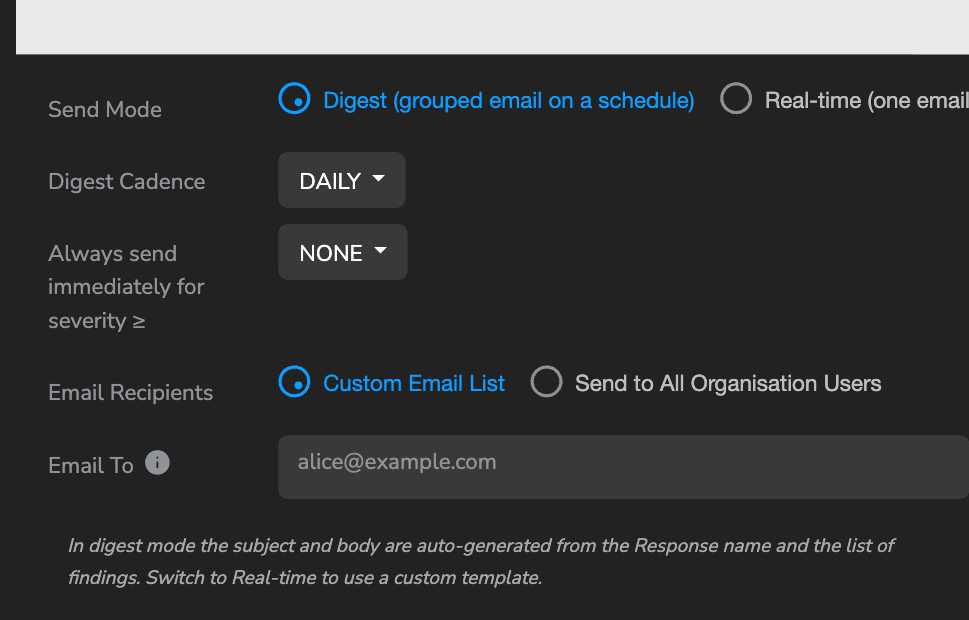
Real-time
Each matching threat produces one email per recipient immediately — this is the original Response behaviour, suitable for low-volume high-priority alerting (a single critical rule, a specific IoC list, etc.).
- Uses the configured Subject, Body, and Content Type template fields.
- All response-template variables (
{{threat_id}},{{name}}, etc.) apply. - Recipients are defined by Email Recipients (Custom Email List or Send to All Organisation Users).
Use real-time when you want every matching threat to generate its own email — for example a named “CRITICAL vuln watch” response that pages an on-call email alias.
Digest (default for new email operations)
Matching threats are queued and delivered as a single grouped email per recipient on a schedule.
This is the right default for most Responses — particularly anything that can match tens or hundreds of threats in a short time window (vulnerability scanner output, bulk IoC matches, noisy rule groups). Without digest mode, a single vulnerability scan across a new host can fire thousands of emails to the same recipient.
Controls available in Digest mode
- Digest Cadence — how often a digest email is sent per recipient:
HOURLY,DAILY(default), orWEEKLY. - Send immediately for severity ≥ — a bypass: threats at or above the chosen severity skip the queue and fire a real-time email using the configured Subject/Body template. Default
NONE(nothing bypasses). Options:NONE,LOW,MEDIUM,HIGH,CRITICAL.
In digest mode the Subject, Body, and Content Type fields are hidden. The subject and body are auto-generated from the Response name and the list of findings. If you flip back to Real-time later the stored template values are restored — your customisations aren’t lost.
Digest batching only applies to Threats. An email operation on a Response with Scope SIGNAL or ALL sends Signal notifications in real time whatever the Send Mode is set to.
What the digest email looks like
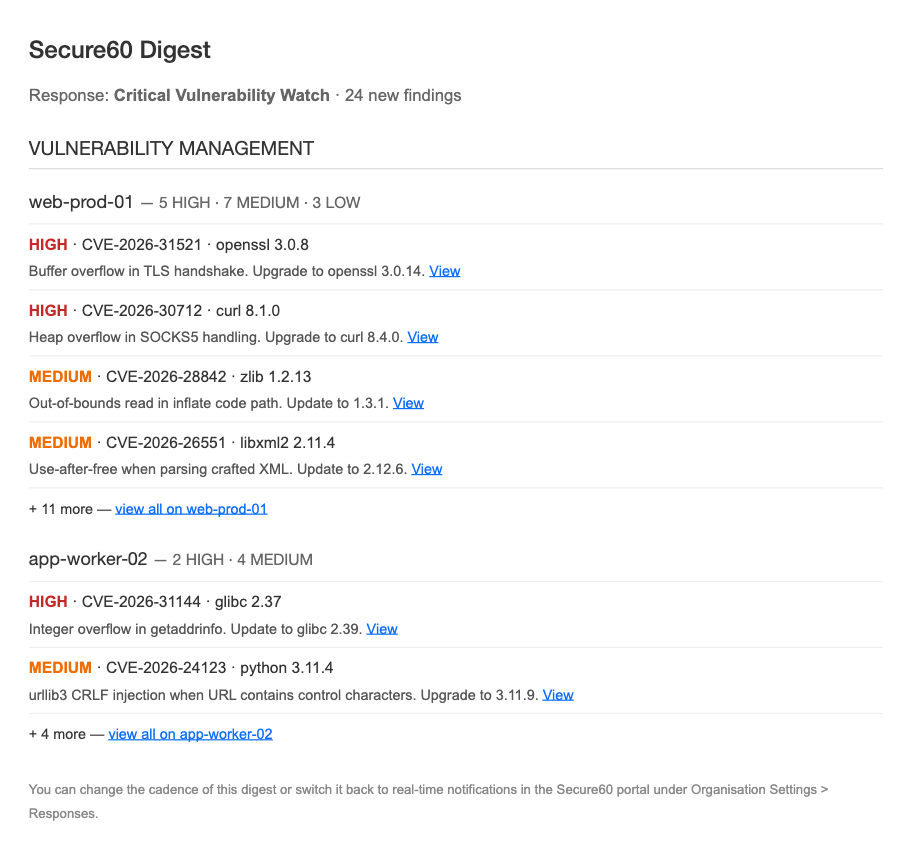
- Header: “Secure60 Digest — {Response Name} — {N} findings”.
- Findings grouped by category (Vulnerability Management / Threat Intelligence / Rules) — collapsed to a single group when only one category matches.
- Within each category, grouped by host with severity counts in the heading (e.g. “web-prod-01 — 12 HIGH · 20 MEDIUM · 15 LOW”).
- Up to 10 threats per host, each shown as two lines: SEVERITY · CVE · package, then a one-line recommendation snippet and a View link into the Portal.
- An overflow line appears when more threats exist: "+ 17 more — view all on web-prod-01".
When digest emails fire
The response-digest cron runs every hour on the hour (UTC). For each queued (response, recipient) pair, the cron decides whether to fire based on the configured cadence and the recipient’s Time Zone (set on the User record — see User Management):
- HOURLY — fires every hourly tick where the last digest was more than 60 minutes ago. Timezone-agnostic.
- DAILY — fires once per recipient-local day at the first hourly tick where local time is 08:00 or later. A user in Sydney gets their digest at 08:00 Sydney; a user in London at 08:00 London.
- WEEKLY — fires on the recipient’s local Monday at 08:00.
If a recipient’s email address doesn’t map to a User record, or the User has no Time Zone set, scheduling falls back to UTC. See User Management → Digest Emails and Timezones for the full model.
Choosing the right mode for a Response
| Goal | Use |
|---|---|
| Alert one or two on-call emails about every critical detection | Real-time, optionally filter severity down to HIGH on the Response itself |
| Notify a team about bulk vulnerability/threat-intel findings without flooding them | Digest, DAILY, bypass NONE |
| Same as above but escalate HIGH severity immediately | Digest, DAILY, bypass HIGH |
| Time-sensitive review cadence (e.g. every hour during an incident) | Digest, HOURLY |
| Weekly summary for a stakeholder who doesn’t triage day-to-day | Digest, WEEKLY |
 Back to top