Governance, Risk & Compliance Solution
The Secure60 Governance, Risk & Compliance (GRC) solution provides a complete framework for managing compliance posture, risk assessments, and audit readiness — all within the same platform as your active security monitoring. Designed for organisations that need to maintain continuous compliance across frameworks such as ISO 27001, SOC 2, PCI DSS, and more, it brings automated status tracking, evidence management, and review workflows into a single integrated experience.
Key Capabilities
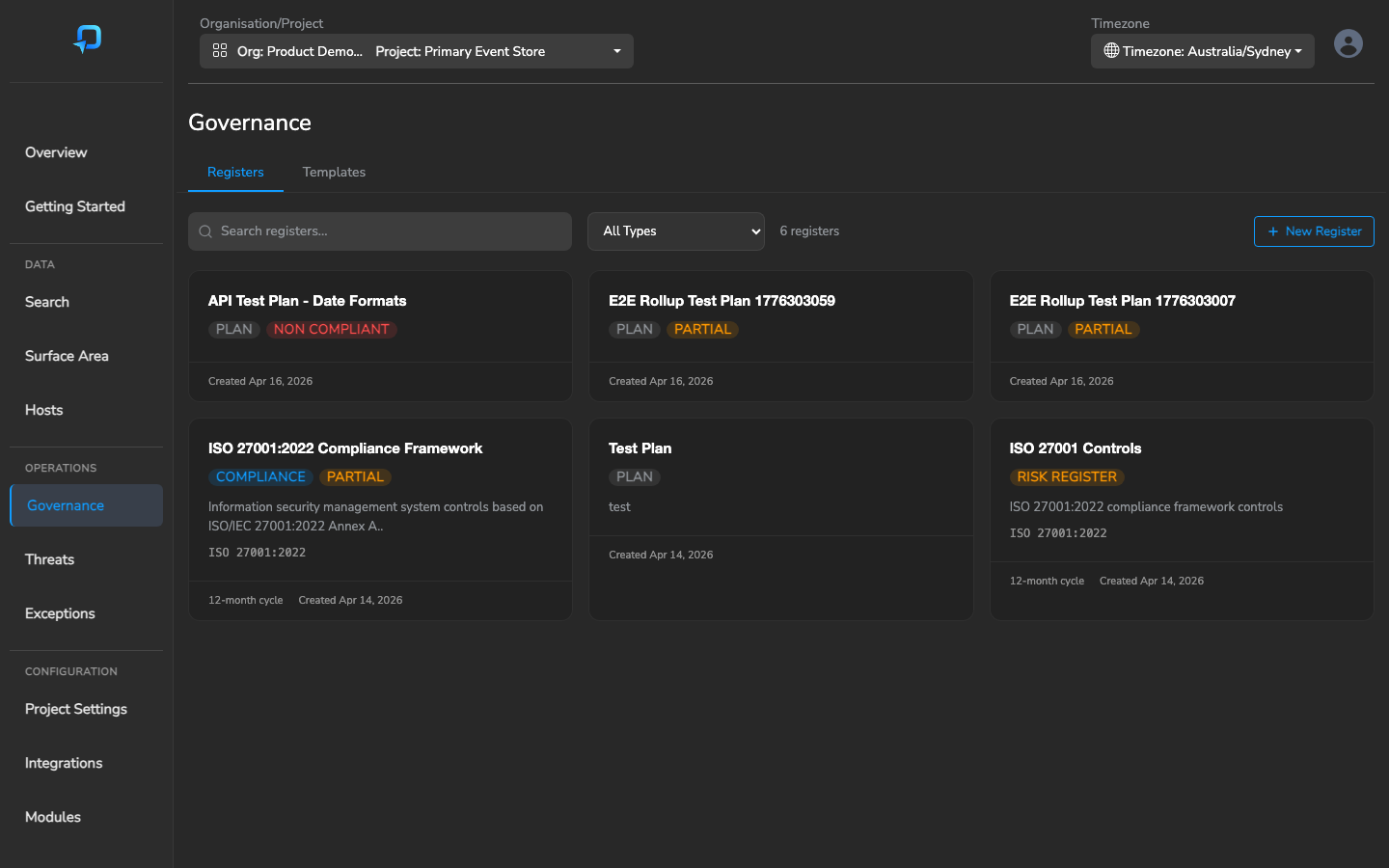
Compliance Framework Management
- Multi-Framework Support - Manage ISO 27001, SOC 2, PCI DSS, NIST CSF, Essential 8, and custom compliance frameworks
- Three Register Types - Risk Register, Compliance Framework, or Custom to suit your governance needs
- Three-Tier Hierarchy - Organise controls into Framework > Control Group > Individual Control for clear structure
- Pre-Built Templates - Deploy industry-standard framework templates with one click. The Secure60 team can make additional templates available on request — contact support@secure60.io
- Template Deployment - One-click deployment creates a fully populated register with all control groups and controls ready for assessment
Control Assessment & Evidence
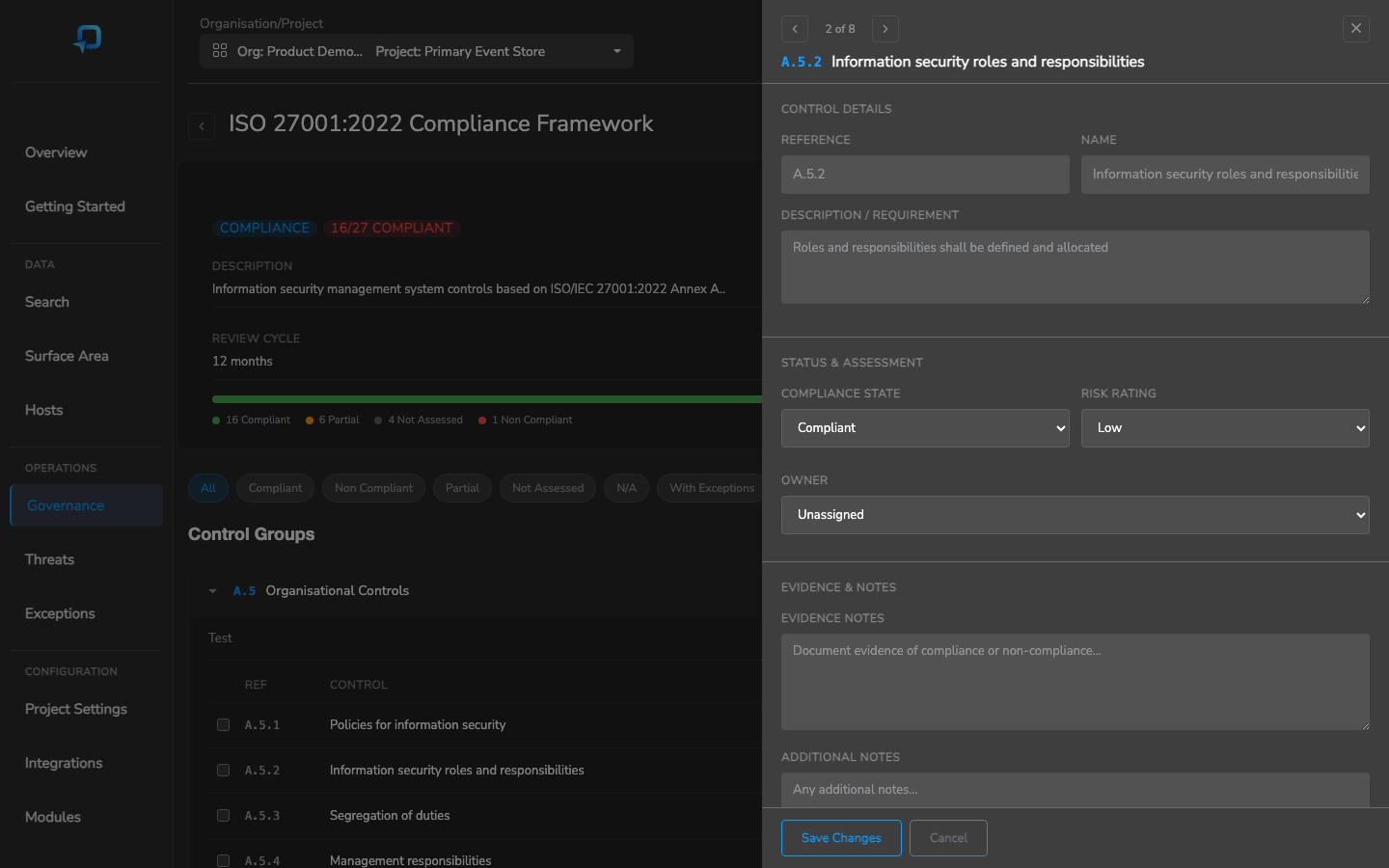
- Assessment Drawer - A wide, purpose-built panel for working through controls one-by-one with all details visible
- Prev/Next Navigation - Move sequentially through controls without closing the drawer, respecting any active filters
- Compliance Status Tracking - Set each control as Compliant, Non-Compliant, Partial, Not Assessed, or Not Applicable
- Risk Rating - Classify risk as Critical, High, Medium, Low, or Info per control
- Owner Assignment - Assign responsible individuals to each control, with bulk assignment for efficiency
- Evidence Attachment - Attach notes, URLs, file uploads (PDF, DOCX, XLSX, CSV, TXT, images up to 10MB), portal page links, and report links
Automated Compliance Rollup
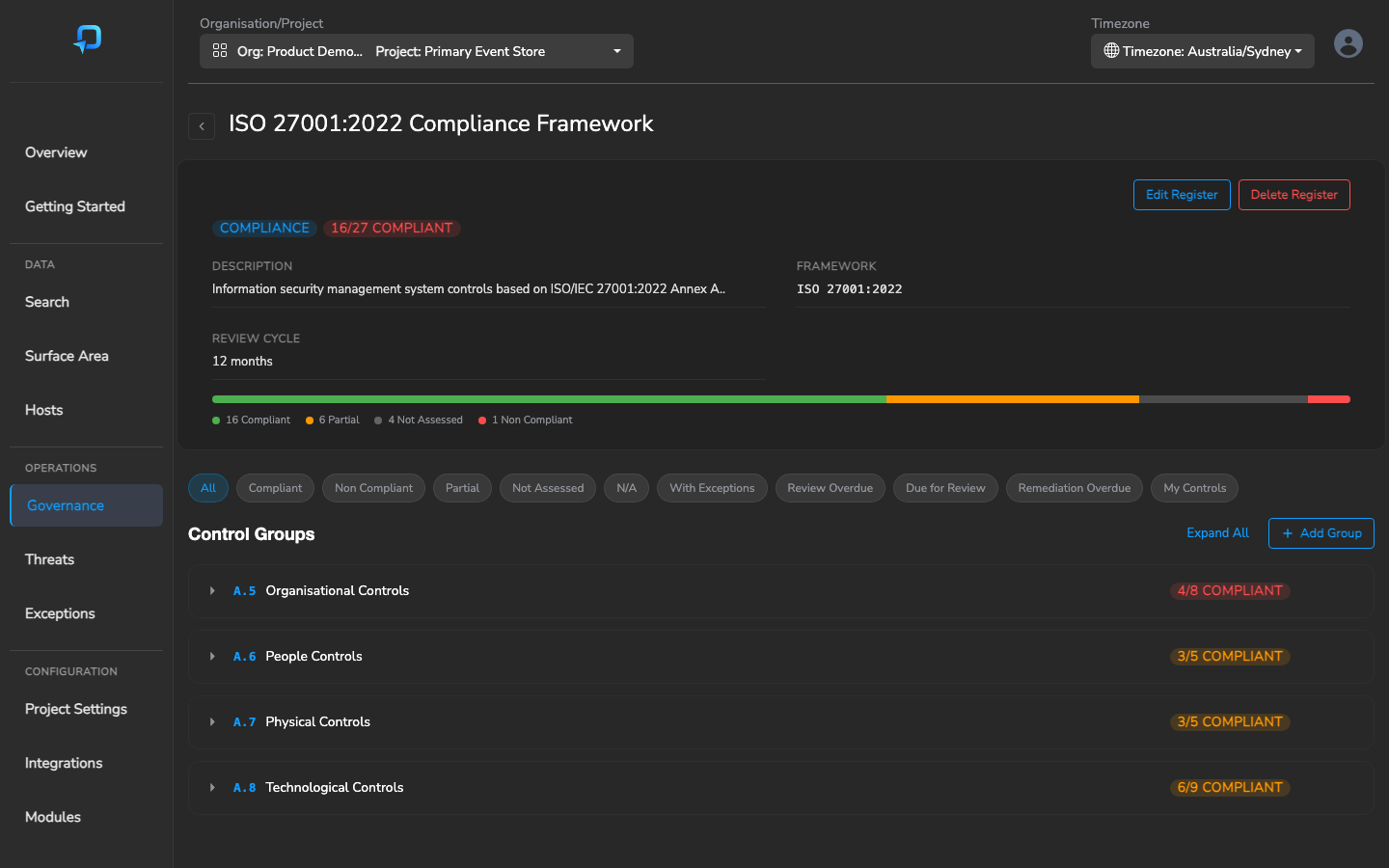
- Automatic Posture Calculation - Compliance status rolls up automatically from individual controls through control groups to the register level
- Visual Rollup Bar - Colour-coded bar segments show compliance posture at a glance — green (compliant), yellow (partial), grey (not assessed), red (non-compliant)
- Intelligent Exclusions - Not Applicable controls are excluded from compliance totals, giving accurate pass rates
- Manual Override - Override the calculated rollup status at group or register level when needed
Exceptions & Compensating Controls
- Exception Management - Raise exceptions for controls that cannot be directly met, with a documented reason and compensating control description
- Risk Acceptance - Record formal risk acceptance statements alongside each exception
- Configurable Expiry - Set exception expiry to 6 months, 12 months, 2 years, or no expiry, with the ability to extend as needed
- Visual Indicators - Excepted controls display as Compliant with a star indicator, making them easy to identify and filter
Review & Audit Workflows
- Two-Tier Review Model - Separate control-level reviews (performed by control owners) and register-level attestation signoffs (performed by the register owner). Control reviews confirm individual control compliance; register reviews are a lighter-weight attestation that the register overall is in acceptable shape — explicit, auditable, and decoupled from cascading changes
- Register Owner Accountability - Each register has a nominated owner (typically a compliance lead, CISO, or ISO) who is accountable for periodic attestation of the register’s overall state — distinct from the individual control owners
- Configurable Review Periods - Set review cadence from daily through to annual, at register level or per individual control. Register-level attestations follow the register’s configured review period
- Review Outcomes - Record review results as Confirmed, Issue Found, or Needs Action
- Review Timeline - Full review history per control and per register, visible in the drawer and register detail — each entry captures reviewer, timestamp, outcome, and narrative notes
- Smart Filters - Quickly identify overdue reviews, upcoming reviews, and controls requiring attention
- Complete Audit Trail - Every change to every control is recorded with FROM/TO diffs, providing a comprehensive audit history. Register attestations form a separate, parallel timeline for register-level signoffs
Integration with Active Monitoring
Unlike standalone GRC tools, Secure60 integrates governance directly with your active security monitoring. Evidence attached to controls can link directly to portal pages — including Hosts, Threats, Surface Area, Analytics, and Exceptions — connecting your compliance assessments to live security data. This means your compliance evidence stays current and traceable back to the security monitoring that underpins it.
The exception system integrates with the platform’s Entity system, providing unified visibility across governance exceptions and security exceptions in a single view.
Notifications & Collaboration
- Email Digest Notifications - One consolidated email per user per day, covering both control-level reviews the user owns (remediation overdue, review due today, due this week, due this month) and register-level attestations the user owns as register owner. A user who owns both controls and a register receives a single combined digest, not multiple emails
- User-Configurable Preferences - Each user independently controls their notification frequency for control-level and register-level reminders: 1-month ahead, 1-week ahead, due today, and overdue reminders (daily, weekly, or none)
- Role-Based Access - Four access levels ensure the right people have the right permissions:
- Admin and Operator Manager - Full create, update, and delete access
- Operator - Read and update access for day-to-day assessment work
- Read Only - View-only access for auditors and stakeholders
- Bulk Actions - Batch status updates, owner assignments, and review submissions for efficient management of large frameworks
Implementation Approach
Phase 1: Framework Deployment
- Request compliance framework templates from the Secure60 team (support@secure60.io)
- Deploy templates with one click to create fully populated registers
- Review and customise the control structure for your organisation
- Assign control owners across your teams
Phase 2: Initial Assessment
- Work through controls using the assessment drawer
- Set compliance status and risk ratings for each control
- Attach initial evidence — notes, documents, URLs, and links to portal pages
- Raise exceptions with compensating controls where direct compliance is not achievable
Phase 3: Review Cadence & Notifications
- Configure review periods per register or per individual control
- Set up email notification preferences for control owners
- Establish review workflows and approval processes
- Train your team on review submission and exception management
Phase 4: Ongoing Governance
- Monitor compliance posture via rollup dashboards and visual status bars
- Use smart filters to address overdue reviews and remediation items
- Maintain evidence currency and keep audit trails comprehensive
- Use reporting and export capabilities for auditor and stakeholder visibility
For a narrative walkthrough of the end-to-end governance journey, see the Governance Lifecycle Workflow guide. For detailed setup and feature reference, visit the Governance & Compliance Management Guide or contact our specialists at support@secure60.io.
 Back to top