Implement Data Masking
This guide shows you how to mask, redact, and drop sensitive data using the Secure60 Portal. Every control here runs inside your environment, on the collector, before any data crosses the boundary — a masked value is never transmitted to the platform in its original form, and there is nothing to purge afterwards.
Overview
Log data collects values nobody intended to log: a password in a query string, a card number in an application trace, a customer identifier inside an XML payload. Six controls handle them, and they differ in how much of the event they keep:
| Control | What happens | Use it when |
|---|---|---|
| Remove Fields by Name | The named field is deleted | The field is never useful — debug blobs, internal identifiers |
| Remove Fields Containing | The field is deleted when its content matches | The field is usually fine and occasionally not |
| Drop Events Containing | The whole event is discarded | The event has no value at all, and you would rather not pay to store it |
| Redact Partial Content | A regular expression match inside a field is replaced | The field is needed, but a pattern inside it — card, token, address — is not |
| Targeted Content Redaction | Only the sensitive part of a match is replaced, keeping the surrounding structure | Structured payloads where the wrapper carries meaning and the value does not |
| Full Field Redaction | The whole field value is hashed, or replaced with X |
The field must be present and correlatable, but never readable |
Hashing deserves a note of its own. A hashed value is consistent — the same input always produces the same hash — so you can still count distinct users, group by account, and follow one identity across systems, without ever storing who they are.
Where the settings live
In the Secure60 Portal, go to Integrations → Secure60 Collector → Manual Configuration and open the Data Masking and Privacy section.
Privacy controls are configured on the collector itself rather than through the synced parser workflow, so they are read when the collector starts. Everything else about a collector — profiles, parsers, the log formats it understands — is managed under Collectors and reaches it automatically.
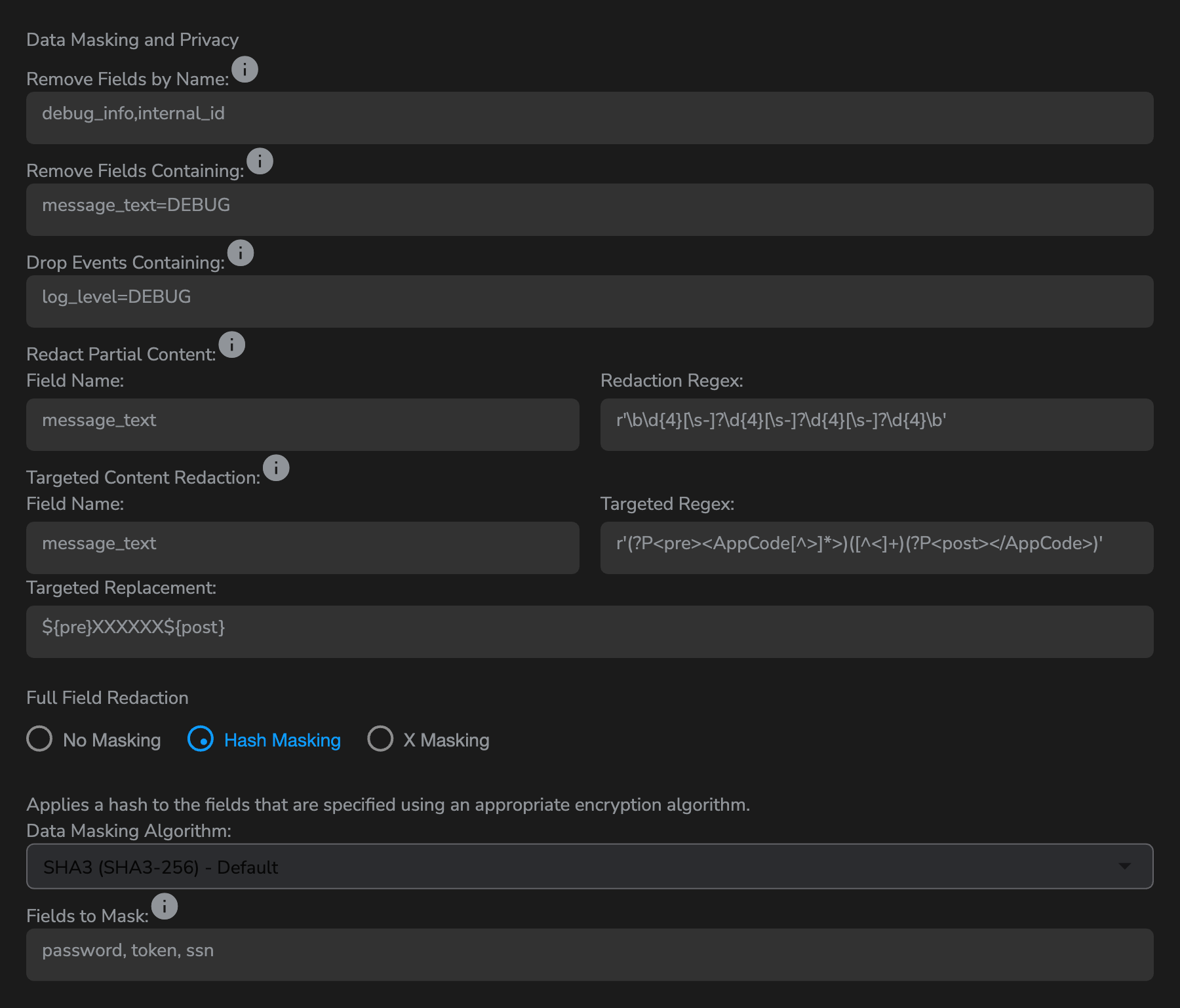
Everything you set here is written into the collector’s .env file, which the same page generates for you. Configure the controls first, then generate the file — the preview updates as you type:
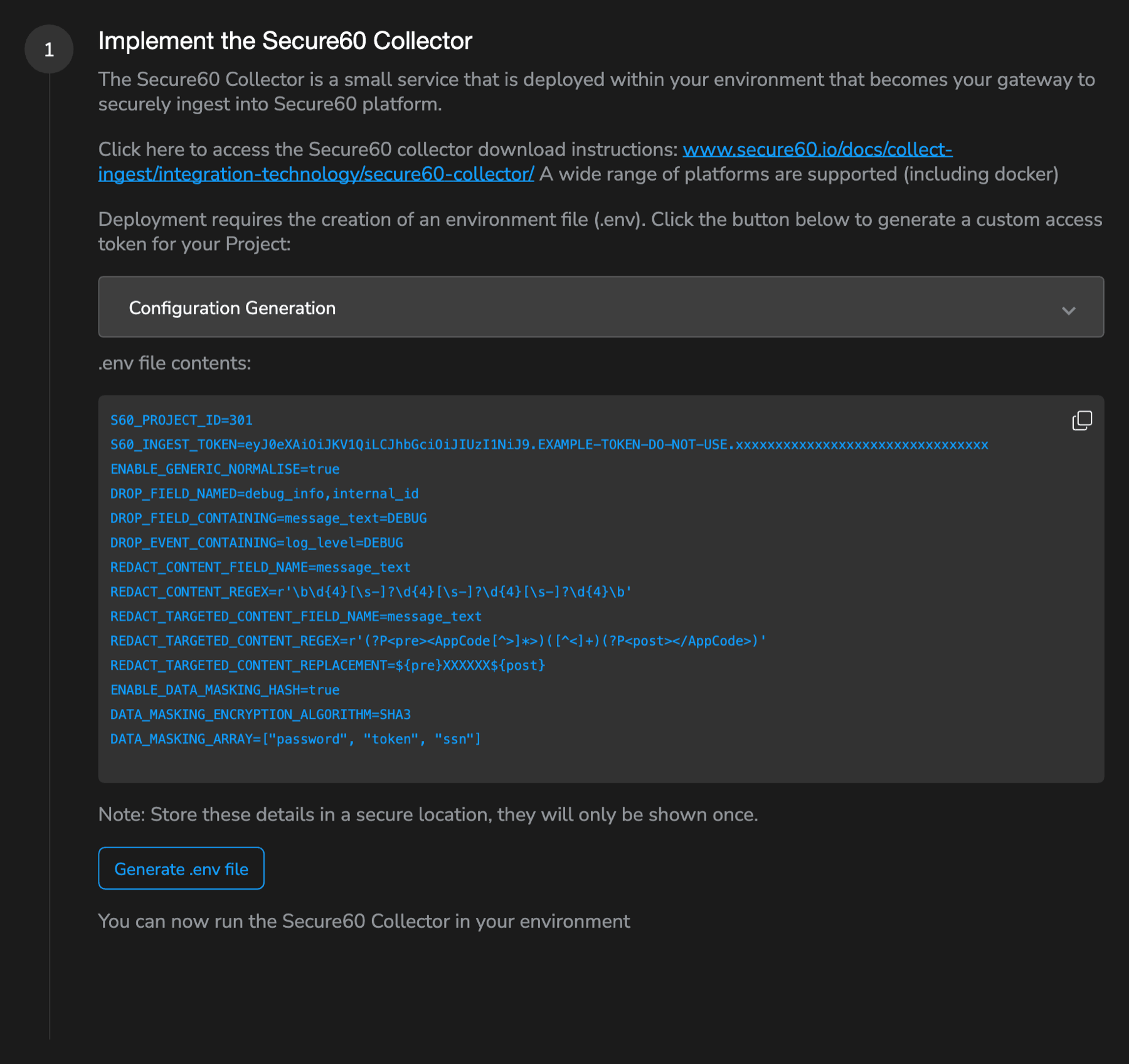

If you have an existing collector
The portal generates a complete .env. On a collector that is already running, copy the privacy lines into your existing file rather than replacing it — your project ID, ingest token, and any deployment-specific settings need to stay as they are. Restart the collector afterwards; environment variables are read at start-up:
docker restart s60-collector
Removing fields and events
Remove Fields by Name
Deletes the named fields from every event this collector handles. Enter a comma-separated list:
credit_card,ssn,secret_token,debug_info
Remove Fields Containing
Deletes a field when its content matches a string. Enter field_name=search_string pairs:
message_text=DEBUG,log_level=TRACE
Drop Events Containing
Discards the entire event when a field contains the string, using the same format:
log_level=DEBUG,http_uri=/healthz
This control is also the main volume lever. Health checks, load-balancer probes, and monitoring-agent traffic are usually the largest low-value share of an ingest stream, and ingest volume is what the platform is priced on. Events dropped here are never billed.
Redacting inside a field
Redact Partial Content
Replaces everything a regular expression matches, leaving the rest of the field intact. Fill in the field name and the pattern:
| Field Name | Redaction Regex |
|---|---|
message_text |
r'\b\d{4}[\s-]?\d{4}[\s-]?\d{4}[\s-]?\d{4}\b' |
Input:  Payment received from card 4532 1234 5678 9012 for order 88213
Output: Payment received from card  for order 88213
Up to 20 independent redaction rules are supported. Other patterns worth having:
| Field Name | Redaction Regex | Catches |
|---|---|---|
request_url |
r'password=[^&\s]+' |
Passwords in query strings |
message_text |
r'\b\d{3}-\d{2}-\d{4}\b' |
Social security numbers |
message_text |
r'Bearer\s+[A-Za-z0-9+/=]+' |
Bearer tokens |
Patterns use the Rust regular expression engine — see the Rust regex documentation for the full syntax. The portal validates the expression as you type and marks it invalid before you can save a pattern that would not compile.
Targeted Content Redaction
Replaces only the sensitive part of a match, using named capture groups to put the surrounding structure back. This is the one to reach for with structured payloads, where deleting the whole match would destroy the field’s shape:
| Field Name | Targeted Regex | Targeted Replacement |
|---|---|---|
message_text |
r'(?P<pre><AppCode[^>]*>)([^<]+)(?P<post></AppCode>)' |
${pre}XXXXXX${post} |
Input:  <MessageType><AppCode DEFAULT=6555>97000027365</AppCode><TransactionAmt>0000000000000000</TransactionAmt>
Output: <MessageType><AppCode DEFAULT=6555>XXXXXX</AppCode><TransactionAmt>0000000000000000</TransactionAmt>
To keep the last few characters visible — enough for an operator to confirm they are looking at the right record, not enough to reconstruct it — capture them in a group and put that group back:
| Targeted Regex | Targeted Replacement |
|---|---|
r'(?P<pre><AppCode[^>]*>)(?P<drop>[^<]+?)(?P<show>[^<]{3})(?P<post></AppCode>)' |
${pre}XXXXXX${show}${post} |
Output: <MessageType><AppCode DEFAULT=6555>XXXXXX365</AppCode>...
20 targeted rules are supported here too.
Full Field Redaction
The bottom of the panel handles whole-field masking. Choose one of three modes and list the fields it applies to.
Hash Masking replaces the value with a cryptographic hash. Pick the algorithm from the Data Masking Algorithm dropdown — SHA3 (SHA3-256) is the default, and the one to use unless something downstream requires otherwise. MD5 and SHA1 are provided for compatibility with existing systems that expect those digests.
X Masking replaces the value with X characters.
Either way, list the fields in Fields to Mask:
password, token, ssn
Fields to Mask is a match on the field name, not an exact list — an entry of token covers token, api_token, and access_token. Query-string parameters inside a matched field are masked too, so ?user=john&password=secret123 becomes ?user=john&password=XXXXXXXXX without a separate rule.
Choosing between hashing and X
Hash the fields you still need to count, group, or correlate — user identifiers, account numbers, session IDs. Two events with the same hashed account still visibly belong to the same account.
X-mask the fields you need to be present but never read — passwords, tokens, secrets. There is nothing to correlate in a password, and the shorter value costs less to store.
Verify the result
Restart the collector, send some traffic through it, then check in Search that the values arrived in the state you expect. Search for the field:
password:*
A hashed field shows a hex string; an X-masked field shows XXXXXXXX; a removed field returns no results at all. If you see the original value, the collector is running with its previous environment — masking settings are read at start-up, not reloaded, so the container needs a restart rather than a configuration sync.
Test on a non-production collector where you can. A regular expression that matches more than intended destroys data that cannot be recovered afterwards, because the original never leaves your environment.
Design notes
- Order. Field and event removal run first, then content redaction, then whole-field masking. A field you remove cannot be redacted later, so if you want both, redact the content and remove a different field.
- Scope. These settings apply to every event passing through that collector. Where different sources need different treatment, run a separate collector for them — see Collectors for organising collectors into groups.
- Cost. A dropped event and a removed field both reduce ingest volume. A masked field does not — the value is still present, in unreadable form.
Related
- Data Masking & Privacy reference — every setting, with the full environment-variable reference and pattern library
- Manual Configuration — the rest of the collector’s
.envsettings - Secure60 Collector — collector groups, profiles, and parsers
- Nginx - Integration Guide — query strings are a common source of secrets in web logs
- Web Application Firewall (WAF) - Integration Guide — WAF events often capture the offending request payload in full
 Back to top