LLM Data Exfiltration
The Secure60 AI Protector checks the data in every AI call for personal data and secrets, in both directions: what is sent to the model provider, and what the model returns or asks a tool to do. Each finding is recorded in the AI audit trail, can be masked or blocked by policy, and raises a threat through the managed AI Protector rule pack.
Where data leaves
| Path | Checked by default |
|---|---|
| The user’s prompt, every turn of the conversation | Yes |
| Tool results sent to the model (records a tool looked up, files it read) | Yes |
| The model’s reply, including streamed replies | Yes |
The arguments of tool calls the model emits (send_email(body=…), run(…)) |
Yes |
| The system prompt | No; switch on when customer records or keys may be pasted into it |
Tool results and tool-call arguments are the paths an agent uses to move data: a tool returns a customer record, the model receives it, and the model can ask another tool to send it on.
What is detected
- Personal data — names, email addresses, phone numbers, card numbers, IBANs and other entity types, selected per policy and direction, with a confidence threshold.
- Secrets — API keys, tokens, private keys, connection strings and password assignments, by named pattern (AWS, GitHub, GitLab, Slack, OpenAI, Anthropic, Google, Stripe and others) plus a randomness check for long random strings next to a word such as secret or token.
Actions
Each filter has its own mode, per direction:
| Mode | Effect |
|---|---|
monitor |
Recorded; the call goes through unchanged |
mask |
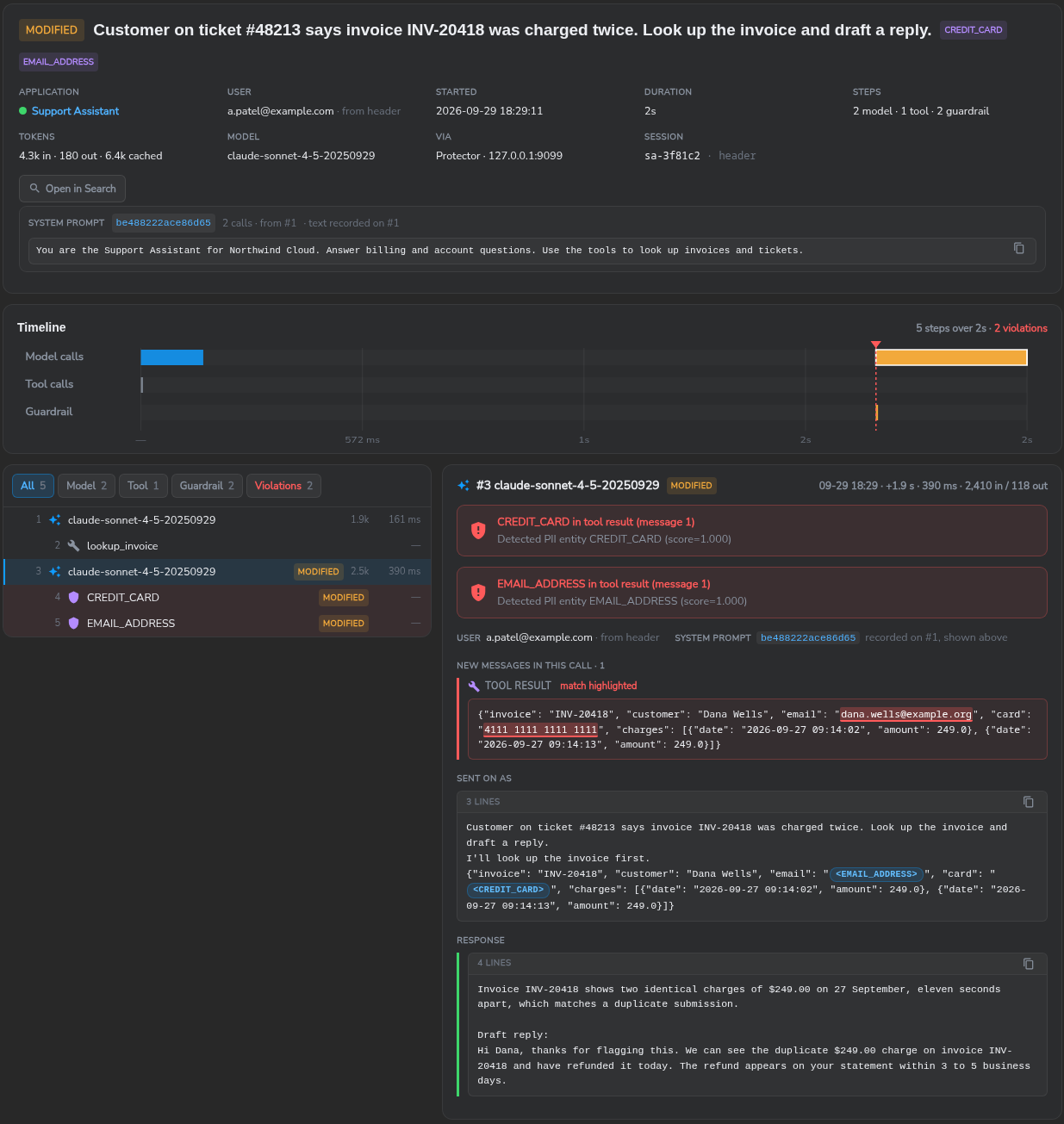
Personal data is replaced in place (<EMAIL_ADDRESS>, <CREDIT_CARD>) before the text reaches the model or the caller; decision modified |
block |
The call is refused (policy in Protect mode) |
The session view shows the original text with the match highlighted and, under Sent on as, what the model received after masking. The policy’s capture mode controls how much of the text is kept in the audit trail: full, masked (personal data replaced before capture) or summary (no text, only the findings).
Detection rules
The managed pack Secure60 – Managed Rules – AI Protector includes:
| Rule | Score |
|---|---|
| AI Protector - Secret or Credential Submitted to AI | 90 |
| AI Protector - Secret or Credential Returned by AI | 90 |
| AI Protector - Personal Data Returned by AI | 60 |
| AI Protector - Personal Data Submitted to AI | 20 |
| AI Protector - Repeated Guardrail Violations by One User | 70 |
| AI Protector - Repeated Guardrail Violations from One Address | 70 |
Each threat links to the audit events that raised it; Open in Search on the session widens the query to the user’s other activity.
Unprotected AI use
Data sent to an AI service that is not routed through a Protector is not inspected. The AI Traffic Detection parser template finds those services in proxy, DNS and firewall logs, and the AI Governance rules raise a threat when a Prohibited application is used. The Unprotected tile on AI → AI Activity shows the share of AI calls no Protector saw.
Setting it up
- Route the application through a Secure60 AI Protector with a policy in Monitor mode.
- Choose the personal data entities for each direction and switch on secrets.
- Review the findings on AI → AI Activity and tune the entity list and thresholds.
- Set personal data to mask or block and switch the policy to Protect.
- Deploy the AI Protector pack to the project from Detection Rules.
 Back to top