AI Audit Trail
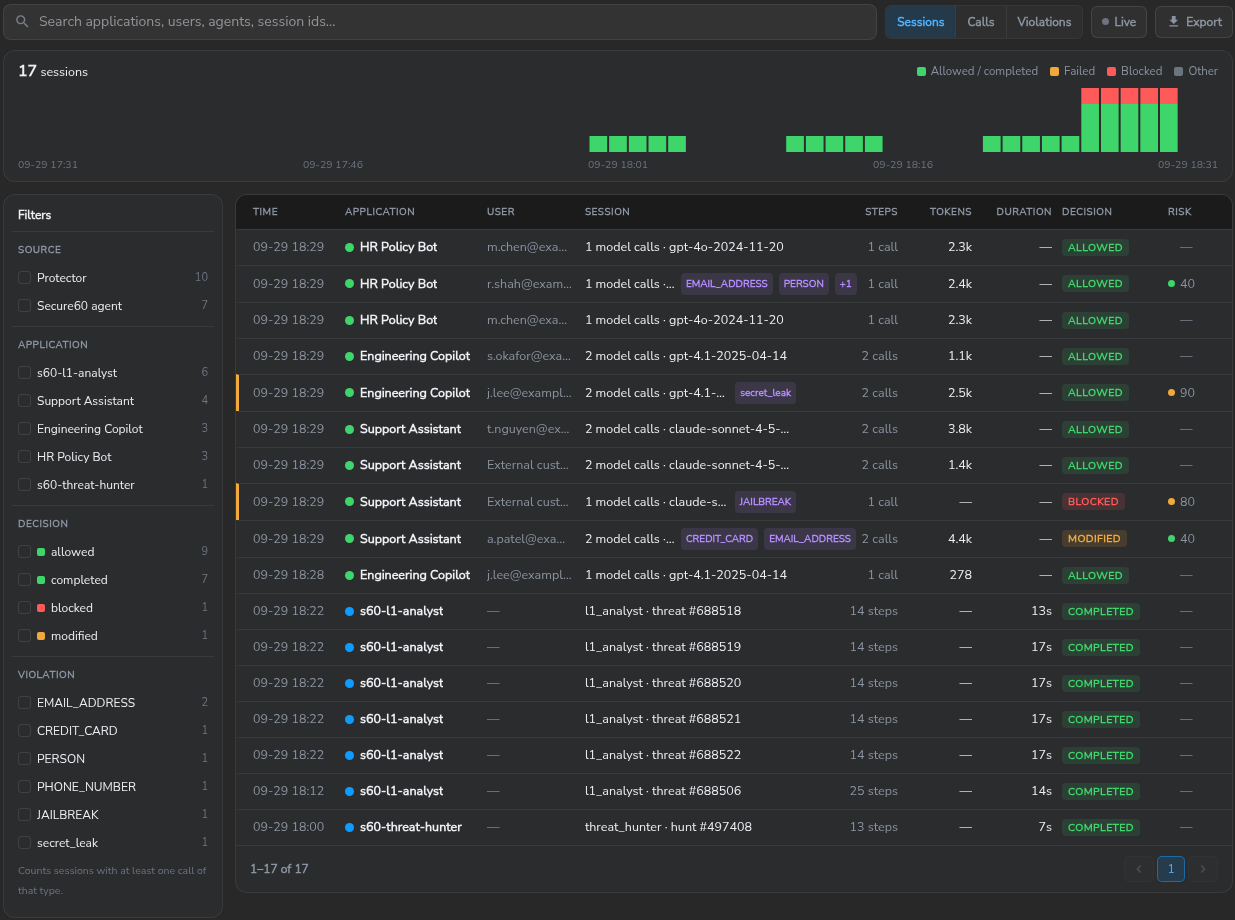
The AI audit trail is the record of every AI call in a project. It is stored as ordinary events in the project, searchable in Search and presented session by session on AI → AI Activity → AI Audit Trail (AI Activity).
What is recorded
Calls through a Secure60 AI Protector
Each call produces one evaluation event (operation = app-guardrail-eval) and one violation event per finding (operation = app-guardrail-violation), joined by event_guardrail_request_id.
| Recorded | Fields |
|---|---|
| Application and provider | app_name, ai_provider, backend |
| Who | user_name, and user_source: which identity step named the user (header, body, token, api_key, default) |
| Session | event_guardrail_session_id, and session_source: header when the caller sent a session id, derived when the Protector derived one from the conversation |
| The new messages of the call | message_new: the messages added since the last assistant turn, tool results included, with their roles in message_roles |
| Prompt and reply | message_text (the latest user message), response_text |
| System prompt | system_prompt_hash on every call; system_prompt text the first time a backend sees it |
| Model and usage | model_used, tokens_in (uncached input), tokens_out, tokens_cached, tool_names |
| Guardrail result | event_guardrail_decision (allowed, modified, blocked), event_guardrail_mode, data_risk_score, outcome |
| Each finding | violation type, direction, the segment it was found in, the rule that matched, and where the match sits in the recorded text |
What the prompt and reply fields carry depends on the policy’s capture mode: full records the text as sent, masked replaces personal data with placeholders such as <EMAIL_ADDRESS>, and summary records no text, only the findings. The Protector’s own capture ceiling can lower it further. Record token usage in a policy’s Audit settings turns the token counts off; the model and tool names are still recorded. The full field list is in Secure60 AI Protector — Audit Event Reference.
Secure60 agent sessions
Secure60 agents record each session and each step: tool calls, decisions and the outcome. Model names and token counts of Secure60 agents are not shown in customer projects.
Network and vendor records
Vendor records sent with operation = ai-usage are counted as calls without content. Proxy, DNS and firewall events tagged by the AI Traffic Detection parser template are not grouped into sessions: opening a network-detected application’s trail lists its events, newest first, with time, user, host and destination, marked Detected on the network · no content.
Sessions
The trail groups calls into sessions by session id. A caller that sends X-S60-Session-Id (or the header set on the backend) controls the grouping; without it, the Protector derives an id so a conversation still groups together.
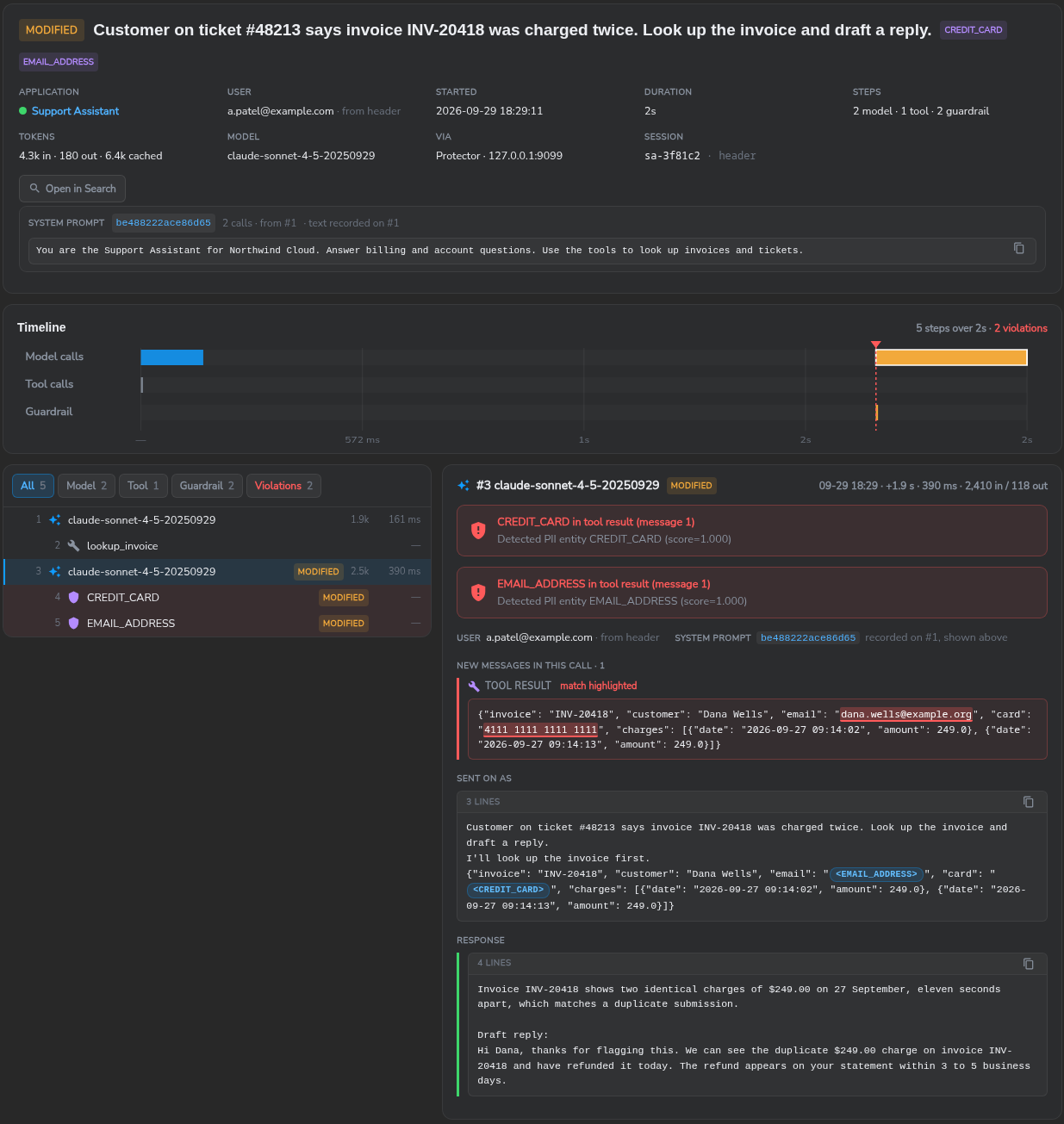
The session view shows the header facts, the system prompt, a timeline of model calls, tool calls and guardrail steps, and each step in detail: the new messages of the call with the matched text highlighted, the text the model received after masking (Sent on as), and the response. See AI Activity — Session view.
Search and investigation
- On the AI Audit Trail tab, search by application, user, agent or session id, group by sessions, calls or violations, and filter by source, application, decision and violation type. Export writes the current view to CSV.
- Open in Search on a session runs its events in Search, where the full event and every field are available and the query can be widened to the user’s or host’s other activity.
- The same events feed dashboards and detection rules. The AI Protector pack raises threats for blocked requests, secrets or personal data submitted or returned, prompt-injection attempts and repeated violations; the AI Governance pack raises threats from lifecycle states (AI Application Lifecycle). A threat links to the events that raised it.
Retention
AI audit events follow the project’s retention like every other event:
- 90 days by default; 180, 365 days or a custom period as a plan option.
- All data stays active and searchable for the full retention window.
- Compliance retention regimes apply to AI audit data the same as any other source.
Integration
- Secure60 AI Protector — the source with content. Point an application’s SDK at the Protector; only its base URL changes (Secure60 AI Protector).
- Network and endpoint logs — link the AI Traffic Detection template to the collector profile that receives proxy, DNS or firewall logs (Discover AI Applications).
- Secure60 agents — recorded automatically in the project they run in.
 Back to top