Digital Risk Protection
Overview
Digital Risk Protection (DRP) watches the risks that sit outside your perimeter — the ones that never touch your logs, so a SIEM alone cannot see them. It runs as a scheduled agent per project, discovers external exposure, and promotes the serious findings into your normal threat queue where they are triaged, assigned and governed like any other threat.
Key capabilities:
- Look-alike domains — typosquat and homoglyph domains registered to impersonate your brand, flagged the moment they stand up, with the signals that matter for phishing and BEC (mail-capable, live hosting, valid TLS, registration age).
- Credential & breach exposure — credentials tied to your monitored domains surfacing in breach and stealer-log data.
- AI reputation — how the major AI models answer questions about your brand, catching false or damaging claims as a security and governance risk.
- Email spoofing — whether anyone can send mail that claims to be from your domains, read from public DNS, and who is sending as them, read from the DMARC reports receivers such as Google and Microsoft send every day.
- One context — high and medium findings become managed threats in your existing Threat Overview queue, triaged by your agents and governed by the same exception and response controls.
Where the other capabilities look inside-out (the telemetry you send in), DRP looks outside-in (the attack surface you don’t control). Both land in one context.
Look-alike domains
Domains registered to resemble yours — character insertions and omissions, transposed letters, homoglyphs (visually identical characters from other alphabets), hyphenation and alternate TLDs. Each candidate is resolved and scored on the signals that decide whether it is a real threat:
| Signal | Why it matters |
|---|---|
| Mail-capable (MX present) | The domain can send mail as you — the setup for invoice fraud and business email compromise. The single strongest signal. |
| Resolves to a live host | Something is serving on the domain rather than parked. |
| Valid TLS certificate | It looks legitimate to a visitor in a browser. |
| Registration age | Most malicious look-alikes are young. A domain registered days ago scores far higher than one registered a decade ago. |
Registration age is read from RDAP, with a WHOIS fallback for registries RDAP doesn’t serve. Where a registry publishes no registration date at all (auDA, for .com.au and .org.au, is one), the age is shown as unavailable rather than guessed — an absent age is never treated as a risk signal.
Domain age is deliberately not certificate age. A certificate is typically reissued every 90 days, so certificate freshness says nothing about how long a domain has existed.
Credential & breach exposure
Credentials tied to your monitored domains appearing in breach and stealer-log data — surfaced as an actionable threat so you can force resets before the credentials are used.
AI reputation
How the major AI models answer questions about your brand. Reputation-shaping and false claims in AI answers are treated as a security and governance risk, not a marketing metric. A default set of questions is built in, and you can add your own for the claims specific to your business.
Email spoofing
Email spoofing covers mail sent with your exact domain in the From address, by servers you have not authorised. Look-alike domains cover the other half of email impersonation: a domain that only resembles yours.
Email posture
Every scan reads each monitored domain’s email records from public DNS. No configuration or access is needed.
| Check | What it tells you |
|---|---|
| DMARC policy | Whether receivers are asked to deliver, junk or block mail that fails authentication. No DMARC record means forged mail is delivered. A policy of p=none is monitoring mode: receivers report forged mail but still deliver it. It is shown as Not enforced, a warning rather than a threat, because it is the normal first step before moving to quarantine and reject. |
| SPF | Which servers may send for the domain. An SPF record ending in +all authorises every server on the internet; a record needing more than 10 DNS lookups fails at many receivers. |
| DKIM | Whether the domain publishes signing keys under the selectors used by common mail services. |
| Parked domains | A domain that receives no mail should publish v=spf1 -all and a DMARC p=reject record, so it cannot be used for forgery. |
| MTA-STS | Whether inbound mail to the domain is required to use an encrypted connection. |
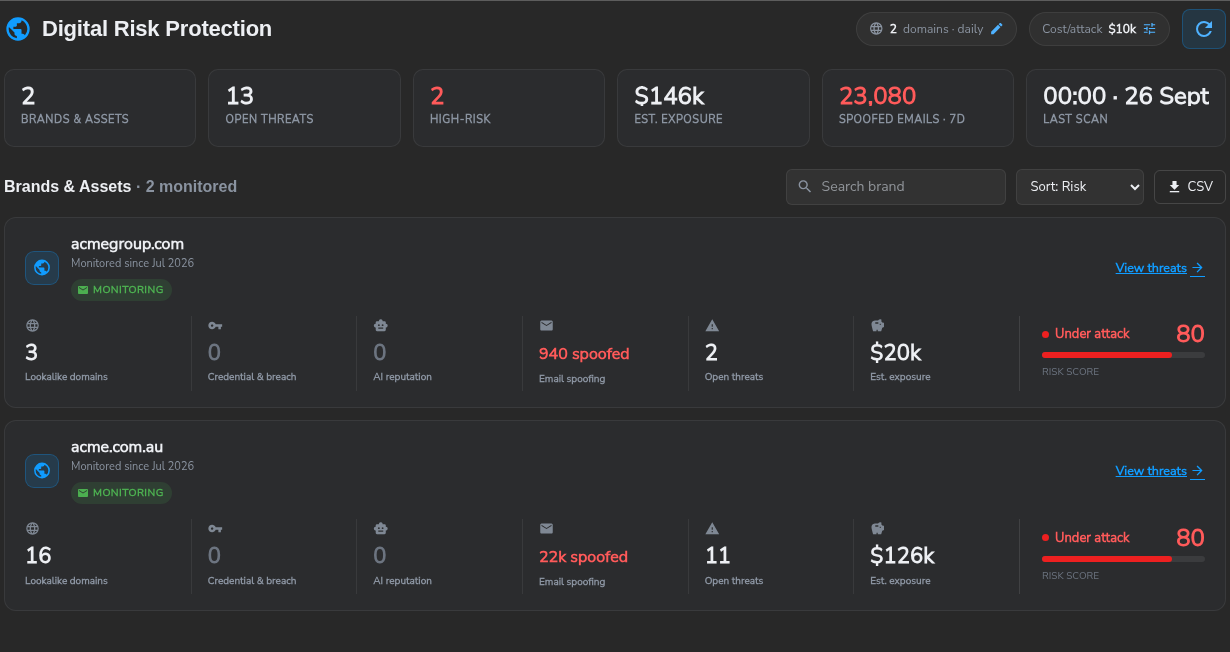
A domain that can be spoofed is raised as a threat. A domain in monitoring mode is not; once DMARC reports are connected, spoofed mail actually seen in the reports is raised as a threat. When the domain also has a mail-capable look-alike, the threat is raised at high severity, because both the real domain and a look-alike can be used for invoice fraud and phishing. The threat is closed automatically on the first scan that finds the records fixed.
DMARC reports
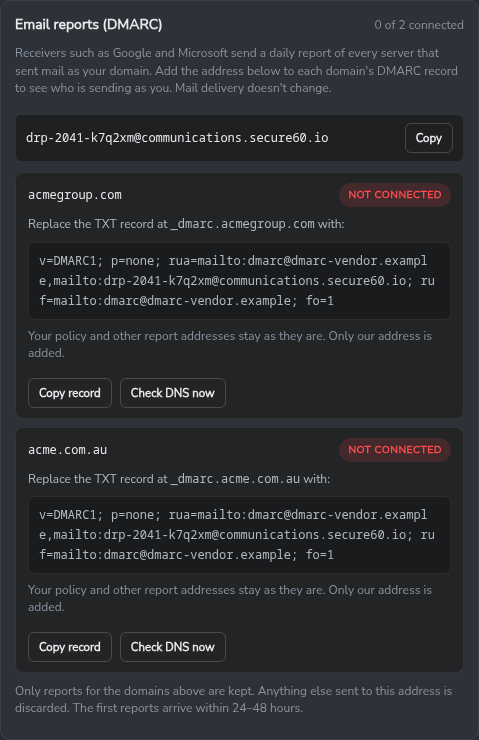
Receivers send a daily aggregate report to every address listed in a domain’s DMARC rua= tag. Each report lists the servers that sent mail claiming to be from the domain, how many messages each sent, and whether the mail passed authentication. Adding the Digital Risk report address to the record sends a copy of those reports to Secure60. Mail delivery does not change, and existing report addresses keep receiving their reports.
Reports are parsed as they arrive and stored in the project as dmarc-report and dmarc-record events, so they can be searched and reported on like any other data. Reports for domains that are not monitored in the project are discarded.
How to connect DMARC reports
- Open Digital Risk and select the domains chip in the page header to open the settings.
- Under Email reports (DMARC), select Create report address. The address is unique to the project.
- For each domain, copy the record shown and publish it as the TXT record at
_dmarc.<your domain>. The record keeps your existing policy and report addresses and adds the Secure60 address. A domain with no DMARC record is given a monitor-only starter record. - Select Check DNS now. The domain shows Connected once the record is published. The first reports arrive within 24 to 48 hours.
Senders
The brand page’s Email Spoofing tab lists every sender seen for the domain over the last 7, 14, 30 or 90 days, with message volume and the share that passed authentication. A sender is named only from evidence that cannot be forged: a DKIM signature or SPF check that passed. Mail that passed neither is listed under its source network.
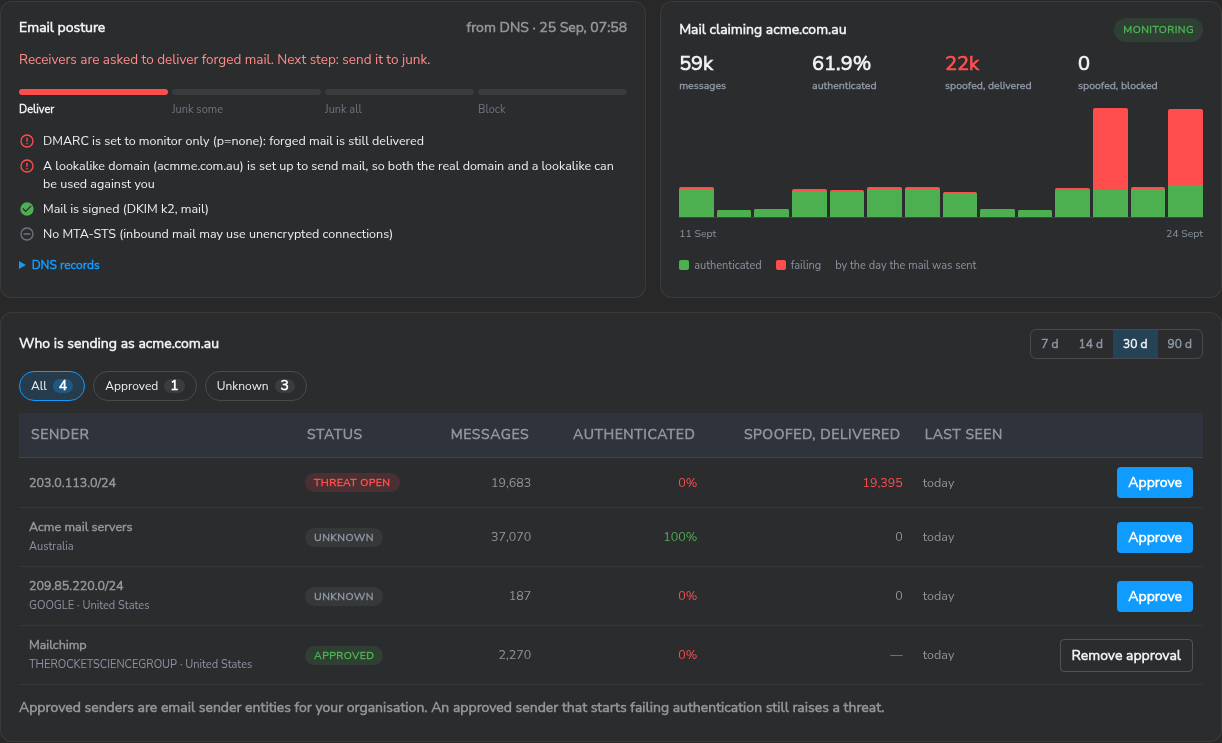
Approving a sender records it as an email sender entity for your organisation. Approved senders are listed on the Entities page and remain approved in periods when they send nothing.
| Detection | Raised when | Severity |
|---|---|---|
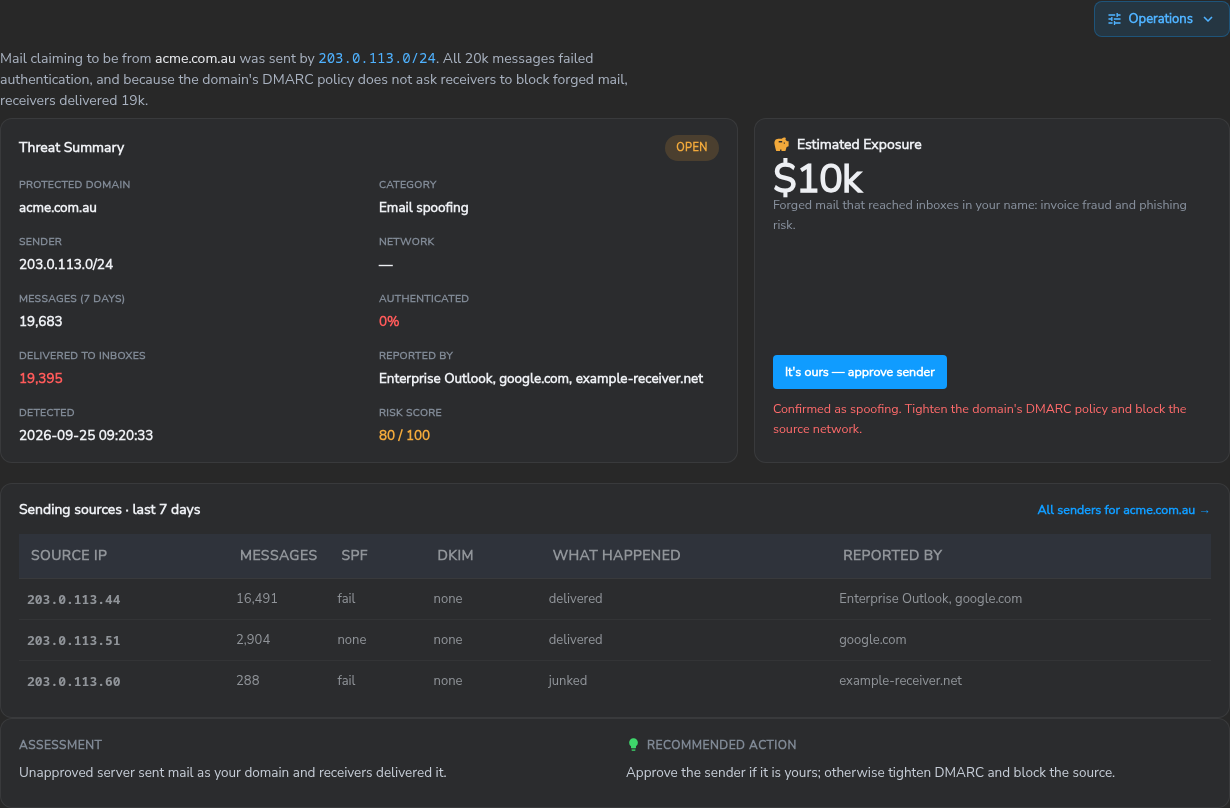
| Forged mail delivered | A sender you have not approved fails authentication and receivers deliver its mail | High |
| Approved sender failing | A sender you approved starts failing authentication, usually after a DKIM key rotation or an SPF change | Medium |
Mail that receivers identify as forwarded, or sent through a mailing list, is shown separately and never raised as spoofing. On a spoofing threat, It’s ours — approve sender approves the sender and closes the threat as benign; Confirm spoofing records the outcome as malicious and keeps the threat open for the response. The L1 Triage worker checks the source network against your look-alike domains and your own mail and firewall logs.
How it works — the lifecycle
Each scheduled scan discovers findings, scores them transparently, and decides — per finding — whether to raise a new threat, leave an existing one alone, or reopen one that has materially worsened. Closing a threat is a human decision the platform respects: a domain you have already dealt with is not raised again unless the risk escalates.
- Watch — the agent scans the domains and brands configured for the project on a schedule (daily by default).
- Detect & score — each candidate is resolved and scored transparently against the signals above, with the reasons recorded so a score can always be explained.
- Decide — the agent compares each finding to the threats that already exist for it (see the lifecycle rules below) and decides whether to raise, leave alone, or reopen.
- Promote & work — high and medium findings become managed threats; lower-risk findings stay as inventory you can browse but are not raised as threats.
The threat lifecycle applies
A promoted Digital Risk finding is a normal platform Threat — it is not a separate object in a separate console. That means the threat lifecycle you already use applies unchanged: severity and score, an owner, notes, exceptions, responses, and a close with an outcome.
The same threat is visible in two places, and they are the same record — a change in one is immediately reflected in the other:
- Digital Risk — the brand-first view. Threats are grouped under the brand or domain they target, alongside the detections that were never promoted.
- Threat Overview — the standard queue, where Digital Risk threats sit next to your internal detections and are triaged, assigned and closed the same way.
Digital Risk threats can also be picked up by your digital workers: the L1 Triage worker assesses them like any other threat, and responses configured for the project fire when they are raised.
How re-detection is handled
A look-alike domain does not disappear because you dealt with it — it stays registered. So the agent cannot re-raise everything it finds on the next scan. Each finding carries a stable identity, and on every scan the agent checks the threats already recorded against that identity:
| What it finds | What happens |
|---|---|
| No existing threat | Raise a new threat — not previously seen. |
| An open threat | Leave it alone. No duplicate is created; the existing threat is already being worked. |
| A closed threat, risk unchanged | Stay closed. Your decision is respected — the domain is not raised again, and appears under Detections as something already dispositioned. |
| A closed threat, risk materially escalated | Reopen the same threat, with a note recording exactly what changed. |
“Materially escalated” is deliberately narrow. It means the domain became more dangerous in a way a human would want to look at again — a parked domain starts sending mail, a live certificate appears, the domain starts resolving, or the verdict moves up a band. A score that drifts a few points because a DNS lookup responded differently is not an escalation and will not reopen a threat you closed.
This differs from vulnerability management, where a remediated finding disappears from the source data. Closing a Digital Risk threat is a human disposition — “we’ve looked at this, it’s fine” or “we’ve dealt with it” — and the platform holds that decision until the facts change.
Enable Digital Risk Protection
Open Digital Risk from the left navigation. If no DRP agent is deployed in the project yet, you’ll see an option to Enable a DRP Agent, which deploys one in basic mode.
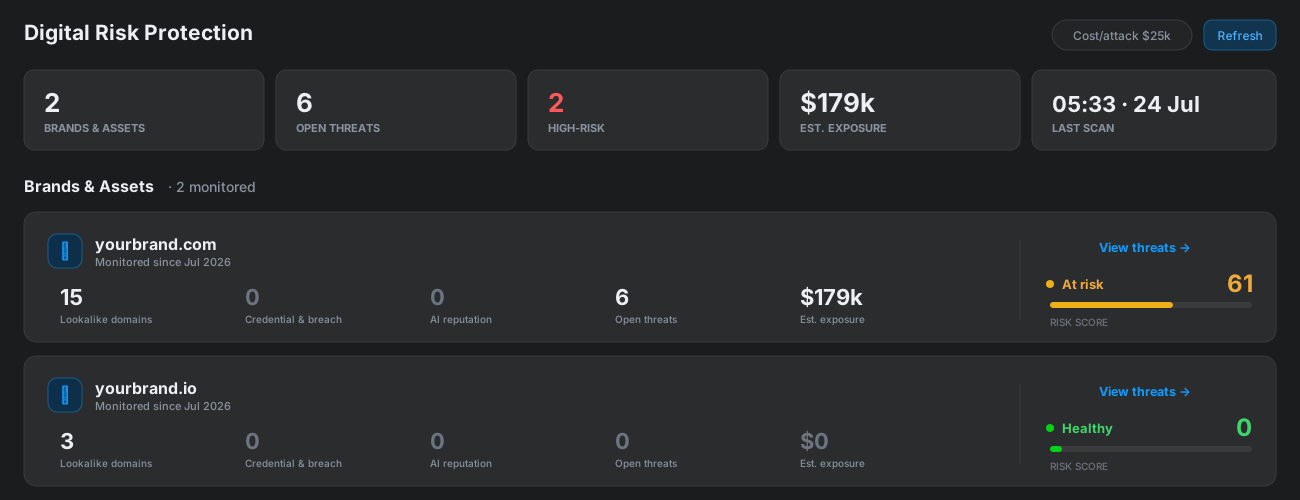
Once enabled:
- Add the domains and brands to monitor in the agent configuration on the Agents page.
- Set Cost Per Attack for the project (default $10,000). The portal uses it to estimate exposure, so the commercial figures reflect your organisation. Tuning it updates every figure without a re-scan.
- The agent runs on its schedule; findings and threats appear on the Digital Risk page.
Working a Digital Risk threat
A DRP threat opens a purpose-built detail view: a plain-language summary, the estimated exposure, the technical evidence (DNS, SSL certificate, WHOIS), and the related-domain graph — with the state shown and an Operations menu for assign / close / add-note / add-exception. The shared timeline sits below, so notes and evidence read in one place.

Findings that were detected but not raised as a threat (below the promotion threshold, or already dispositioned) appear under Detections on the brand page — expand a row to see why it wasn’t raised.
Need Help?
For assistance with Digital Risk Protection, contact support@secure60.io.
See also Detect & Investigate for how threats are triaged and closed once DRP raises them.
 Back to top