AI Application Lifecycle
Every AI application in a project carries a lifecycle state: the organisation’s decision about whether it may be used. The state is stored on the application’s app entity, the reason for it is recorded beside it, and managed detection rules read it to raise threats when a prohibited or retired application is used.
Discovered → Under review → Sanctioned
                          → Restricted
                          → Prohibited
                          → Retired
States
| State | Meaning | Detection |
|---|---|---|
| Discovered | Seen in the data with no registered application. Nobody owns it yet | Listed under Unknown AI. The optional New Unknown AI Application rule raises a LOW threat when it is first seen |
| Under review | Registered and being assessed | Activity is recorded; no lifecycle threat |
| Sanctioned | Approved for use | No lifecycle threat. Guardrail violations on it still raise threats through the AI Protector pack |
| Restricted | Approved for named user groups only | Recorded only. The allowed groups and the reason are stored with the state; no rule checks who uses the application |
| Prohibited | Not allowed | Any use raises a HIGH threat |
| Retired | No longer in use | Any new activity raises a LOW threat: the application came back |
A reason is required to move an application to Restricted, Prohibited or Retired, and optional for the other states. Restricted also names the user groups allowed to use the application; only groups with users in them are offered.
Restricted does not enforce the allow-list. A call from a user outside the allowed groups is recorded like any other call and raises no threat. User names come from the caller (a header, a body field, an unverified sign-in token claim, an API key mapping or a default), so a group-based restriction describes who the caller says they are, not who has been authenticated.
Changing a state
A state is set from the application panel on AI → AI Activity (the details button on an application’s row) or from the application’s page under Entities.
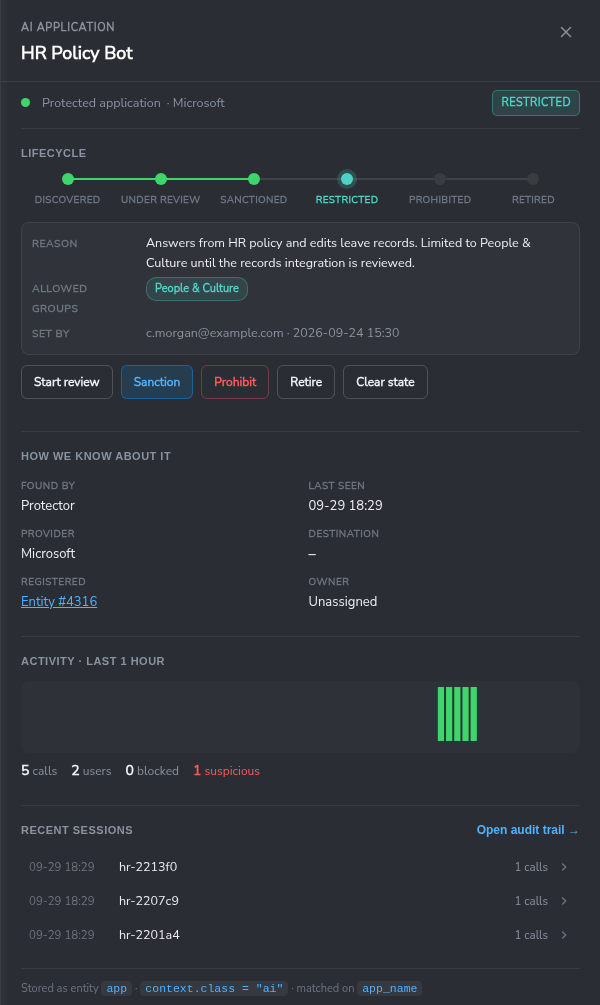
- Open the application panel. The stepper shows the current state.
- Choose the action: Start review, Sanction, Restrict, Prohibit, Retire or Clear state. The next usual step is highlighted.
- Enter the reason, and for Restrict tick the allowed user groups.
- Confirm.
A confirmed change is one write to the entity: the state, and a context.lifecycle record holding the state, the reason, the allowed groups, who set it and when. Other context on the entity is kept. The panel shows the record under the stepper; the entity’s change history keeps earlier states.
An application with no entity yet is registered by its first state change: the panel creates an app entity with context.class = "ai". Clear state removes the state, and the application reads as Discovered again.
A state change reaches the detection rules within about three minutes.
AI Governance rules
The managed pack Secure60 - Managed Rules - AI Governance raises threats from lifecycle states. It keys on the application from every source, so it applies to projects without a Protector.
| Rule | Condition | Severity | Status |
|---|---|---|---|
| AI Governance - Prohibited AI Application Used | isEntityState('Prohibited') AND app_name != '', checked every 10 minutes |
HIGH | Active |
| AI Governance - Prohibited AI Application Used (network) | ai_app_name != '' AND isEntityState('Prohibited'), checked every 10 minutes |
HIGH | Active |
| AI Governance - Retired AI Application Used Again | isEntityState('Retired') AND app_name != '', checked every 60 minutes |
LOW | Active |
| AI Governance - Retired AI Application Used Again (network) | ai_app_name != '' AND isEntityState('Retired'), checked every 10 minutes |
LOW | Active |
| AI Governance - New Unknown AI Application | An application tracked with an AI provider, first seen in the last 15 minutes, with no registered entity | LOW | Inactive; activate it to alert on new AI applications |
Each rule raises one threat per application and links it to the application’s entity.
The rules without (network) cover every source that sets app_name to the AI application: the AI Protector and vendor AI usage records. The (network) rules cover proxy, DNS and firewall events tagged by the AI Traffic Detection parser template, where the AI application is in ai_app_name and app_name still names the log producer.
Deploy the pack to a project from Detection Rules. The Watch tab on AI Activity lists the AI rules deployed on the project and their status.
isEntityState('<state>') can be used in any search or rule. It matches events whose application, user or host entity carries that state. See Query Syntax.
Governance evidence
The set of app entities with context.class = "ai", their states and their recorded reasons form the organisation’s register of AI applications: which applications are approved, who approved them, when, and why. The AI Activity page and the entity change history are the evidence for inventory and acceptable-use controls in the AI governance frameworks.
 Back to top