Client Certificates
A collector group can require every sender on its TLS ports to present a client certificate from a list kept in the portal. A connection without a listed certificate is refused before any data is read. The list is delivered to every collector in the group, and changes reach collectors within about a minute, with no files to mount and no restart.
The setting covers both TLS listeners:
| Listener | Port | Verified sender recorded on events |
|---|---|---|
| Syslog over TLS | 6514/TCP | Yes, as source_tls_subject |
| HTTPS | 443/TCP | No |
Plain syslog (514/UDP) and HTTP (80) are not affected. Client certificates require Secure60 Collector 1.17 or newer. An older collector ignores the setting and keeps accepting TLS connections without a certificate; the portal marks it IGNORES SETTING — see Updating the Collector.
What the list can hold
The list holds public certificates only. Each one is accepted in one of two ways:
| Certificate | Accepts |
|---|---|
| A sender’s own certificate (self-signed) | Senders presenting exactly that certificate |
| A root CA certificate | Every sender whose certificate that CA signed, directly or through an intermediate CA |
Both can be mixed in one list. The portal reads each certificate as it is added and labels it:
| Label | Meaning |
|---|---|
| CLIENT (SELF-SIGNED) | A sender’s own certificate. Accepted on its own. |
| ROOT CA | A self-signed CA. Accepts every certificate it signed. |
| INTERMEDIATE CA | A CA signed by another CA. Accepted only while its root CA is also listed. |
| CLIENT (CA-SIGNED) | A sender’s certificate issued by a CA. Accepted through its CA, which must also be listed; listing it adds nothing on its own. |
| SELF-SIGNED | A self-signed certificate marked as a CA without stating its use — the openssl req -x509 default. Accepted both as a sender’s own certificate and as a CA. |
Turning it on
- Navigate to Integrations → Secure60 Collector → Collectors and click the edit icon of the collector group.
- Open Client certificates. The section stays collapsed while the setting is off.

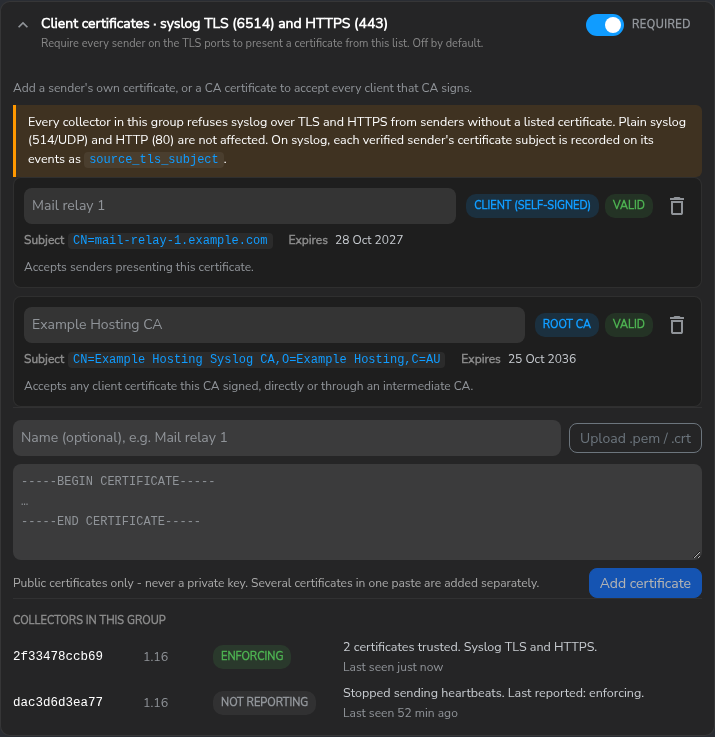
- Add each certificate: paste the PEM text or upload a
.pem/.crtfile, give it a name, and click Add certificate. Several certificates in one paste are added separately. Text containing a private key is refused. - Switch Require client certificates on and click Save Changes. The portal asks for confirmation, because senders without a listed certificate stop delivering as soon as the collectors apply the list.
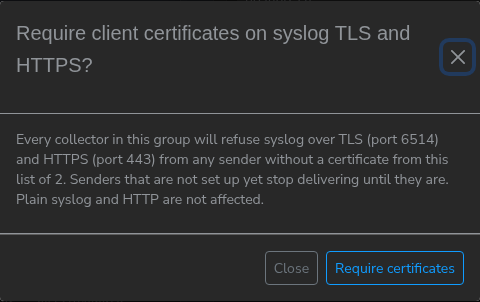
Set the senders up with their certificates before switching it on. Add the certificates first and save with the setting off — the list is stored and nothing is enforced — then switch it on once every sender presents its certificate.
Collector status
Collectors in this group shows what each collector last reported:
| Status | Meaning |
|---|---|
| ENFORCING | Applying the saved list on syslog TLS and HTTPS. |
| PARTIAL | Applying the saved list on one listener. The other listener is defined in mounted configuration, so the setting does not apply to it. |
| UPDATING | Still applying the last saved change. Usually clears within a minute. |
| NOT REQUIRED | The setting is off. |
| FAILED | The collector could not apply the list and keeps its previous listeners. Its application errors give the reason. |
| MOUNTED CONFIG | Both TLS listeners are defined in mounted configuration; the setting does not apply. |
| IGNORES SETTING | The collector is older than 1.17. |
| NOT REPORTING | No heartbeat for more than 10 minutes. The last reported state is shown with it. |
Each row also shows when the collector was last seen.
Warnings before saving
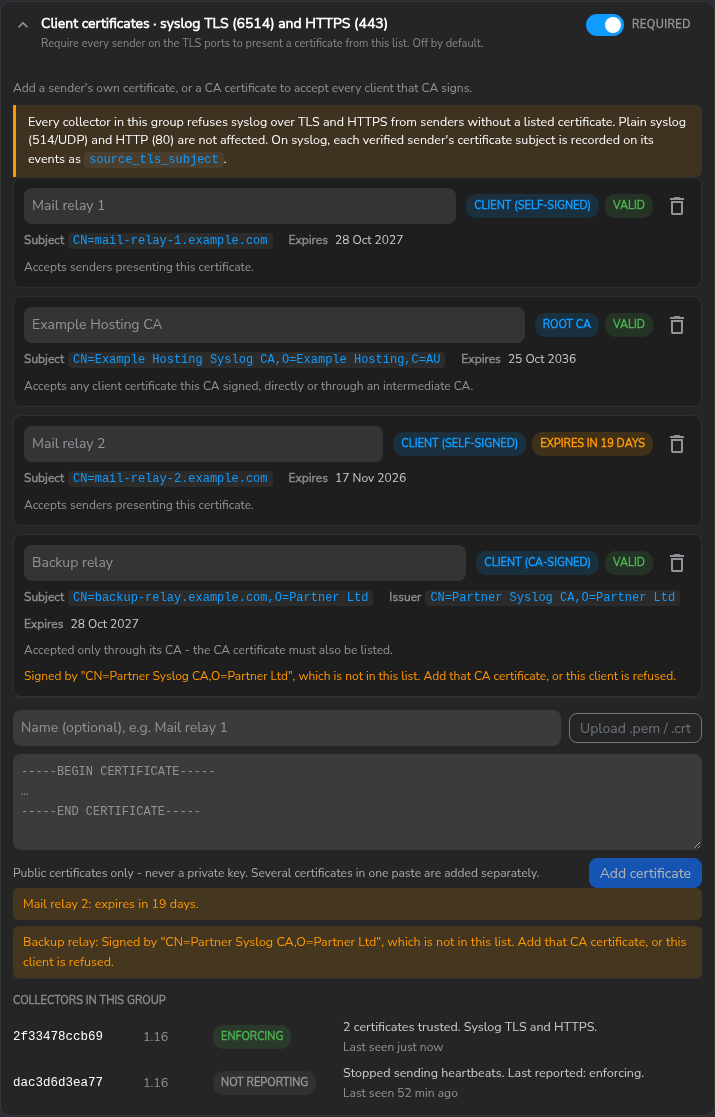
The panel checks the list as it is edited:
- an expired certificate, or one that expires within 30 days;
- a CA-signed certificate or intermediate CA whose chain does not reach a listed root CA;
- the setting switched on with no usable certificate (saving is blocked).
Configuring senders
The collector presents its own server certificate on both ports — the bundled example certificate unless you mount your own (see Manual Configuration — TLS Configuration). With the bundled certificate, senders skip server verification as shown below.
rsyslog
Requires the rsyslog-gnutls package. The certificate and key are set on the forwarding action:
global(workDirectory="/var/lib/rsyslog")

*.* action(type="omfwd" target="COLLECTOR" port="6514" protocol="tcp"
           StreamDriver="gtls" StreamDriverMode="1" StreamDriverAuthMode="anon"
           StreamDriver.CertFile="/etc/rsyslog.d/tls/mail-relay-1.crt"
           StreamDriver.KeyFile="/etc/rsyslog.d/tls/mail-relay-1.key"
           queue.type="LinkedList" queue.filename="s60fwd"
           queue.maxdiskspace="1g" queue.saveOnShutdown="on"
           action.resumeRetryCount="-1")
rsyslog logs CA certificate is not set at start-up with StreamDriverAuthMode="anon"; the warning is expected. The disk-assisted queue keeps events across the reconnection that follows every change to the list.
syslog-ng
destination d_s60 {
  network("COLLECTOR" port(6514) transport("tls")
    tls(cert-file("/etc/syslog-ng/tls/mail-relay-1.crt")
        key-file("/etc/syslog-ng/tls/mail-relay-1.key")
        peer-verify(optional-untrusted))
    time-reopen(1));
};
time-reopen(1) reconnects one second after the collector closes a connection, instead of the default 60.
HTTPS
curl https://COLLECTOR/ -k \
  --cert mail-relay-1.crt --key mail-relay-1.key \
  -H 'Content-Type: application/json' -d '{"message":"test"}'
Checking a certificate against the collector
echo '<14>test: client certificate check' | \
  openssl s_client -connect COLLECTOR:6514 -quiet -cert mail-relay-1.crt -key mail-relay-1.key
A listed certificate holds the connection open; an unlisted one ends with a TLS alert.
Finding events by sender
Each syslog event received over a verified connection carries the sender’s certificate subject in source_tls_subject, most specific part first — for example CN=mail-relay-1.example.com or CN=web-app-1.example.com,O=Example Hosting. The value matches openssl x509 -noout -subject -nameopt RFC2253. It is absent when the setting is off and on HTTPS events.
Certificate lifecycle
Every change to the list follows the same pattern: add the new certificate, move the senders, remove the old one. Collectors apply each saved change within about a minute. Each change makes every TLS sender reconnect once: connections open at the time are closed about 30 seconds after the collector applies the list. A sender with a disk queue and retry, as configured above, loses nothing; a sender without one can lose the message in flight on each connection.
Client certificates
Use this model when each sender, or a small set of senders, has its own certificate.
| Step | What to do |
|---|---|
| Issue | Create a key and certificate on the sender. The private key never leaves it; only the certificate is added to the list. |
| Add | Add the certificate before the sender starts using it, and before switching the setting on. |
| Rotate | Add the new certificate (B) next to the current one (A). Deploy B to the sender. Once events show B’s subject in source_tls_subject, remove A. Both are accepted while both are listed. |
| Share | One certificate can be deployed to many senders and rotated the same way. Those senders then share one source_tls_subject, and a leaked key means replacing the certificate on all of them. |
| Revoke | Remove the certificate. The sender is refused once collectors apply the change. |
| Expire | An expired certificate is refused. The portal warns 30 days ahead; rotate before then. |
To create a sender certificate that is labelled CLIENT (SELF-SIGNED):
openssl req -x509 -newkey ec -pkeyopt ec_paramgen_curve:P-256 -nodes -days 365 \
  -keyout mail-relay-1.key -out mail-relay-1.crt -subj "/CN=mail-relay-1.example.com" \
  -addext "basicConstraints=critical,CA:FALSE" -addext "extendedKeyUsage=clientAuth"
CA certificates
Use this model when many senders hold certificates from one CA. Listing the CA accepts every certificate it signed; senders are added and replaced without touching the list.
| Step | What to do |
|---|---|
| Add | List the root CA. A sender’s certificate issued by that CA is accepted without being listed. |
| Intermediate CAs | List the root CA. A sender whose certificate comes from an intermediate CA then presents the intermediate with its own certificate (its certificate chain). To accept senders that present only their own certificate, list the intermediate CA as well. An intermediate CA listed without its root is refused. |
| Rotate the CA | Add the new CA (CA-2) next to the current one (CA-1). Re-issue sender certificates from CA-2 and deploy them. Once no sender uses a CA-1 certificate, remove CA-1. Senders of both CAs are accepted while both are listed. |
| Revoke one sender | Not possible while its CA is listed: the collector does not check certificate revocation lists, so any unexpired certificate the CA signed is accepted. Use a separate CA for each group of senders that may need revoking on its own, or re-issue the rest from a new CA and remove the old one. |
| Revoke everything a CA signed | Remove the CA. |
| Expire | An expired CA stops accepting every certificate it signed. The portal warns 30 days ahead. Rotate the CA well before then, since every sender needs a new certificate. |
Rotation without an outage
The order is the same for both models:
1. Add B (or CA-2)    list: A + B     A accepted, B accepted
2. Deploy B           senders move    A accepted, B accepted
3. Remove A (CA-1)    list: B         A refused,  B accepted
Check source_tls_subject on recent events, and each collector’s status under Collectors in this group, before removing the old certificate.
Behaviour to know
- The list is stored on the collector group. Every collector in the group applies the same list. Different senders on different collectors call for separate groups.
- Switching off keeps the list. The certificates stay stored with the setting off, ready to switch on again.
- A list that cannot be applied changes nothing. A collector that rejects a list — an unreadable certificate, or the setting on with no certificates — keeps its previous listeners and reports FAILED.
- Restarts fail closed. A collector that restarts with the setting on but without its stored list accepts TLS connections only from inside its own container until its first configuration check restores the list.
- Mounted configuration wins. A deployment that defines either TLS listener in its own mounted configuration keeps that listener, and the setting applies to the other one only (PARTIAL).
- Setting it through the API. The setting is
data.client_tlsin the collector group’s definition:{"enabled": true, "certificates": [{"id": "…", "name": "…", "pem": "-----BEGIN CERTIFICATE-----…"}]}. A PUT replaces the whole definition, so a definition sent withoutclient_tlsswitches the setting off.

Related
- Secure60 Collector — Creating Collector Groups — where the setting lives
- Manual Configuration — TLS Configuration — the collector’s own server certificate
- Updating the Collector — version requirements and the out-of-date warning
 Back to top