Business View
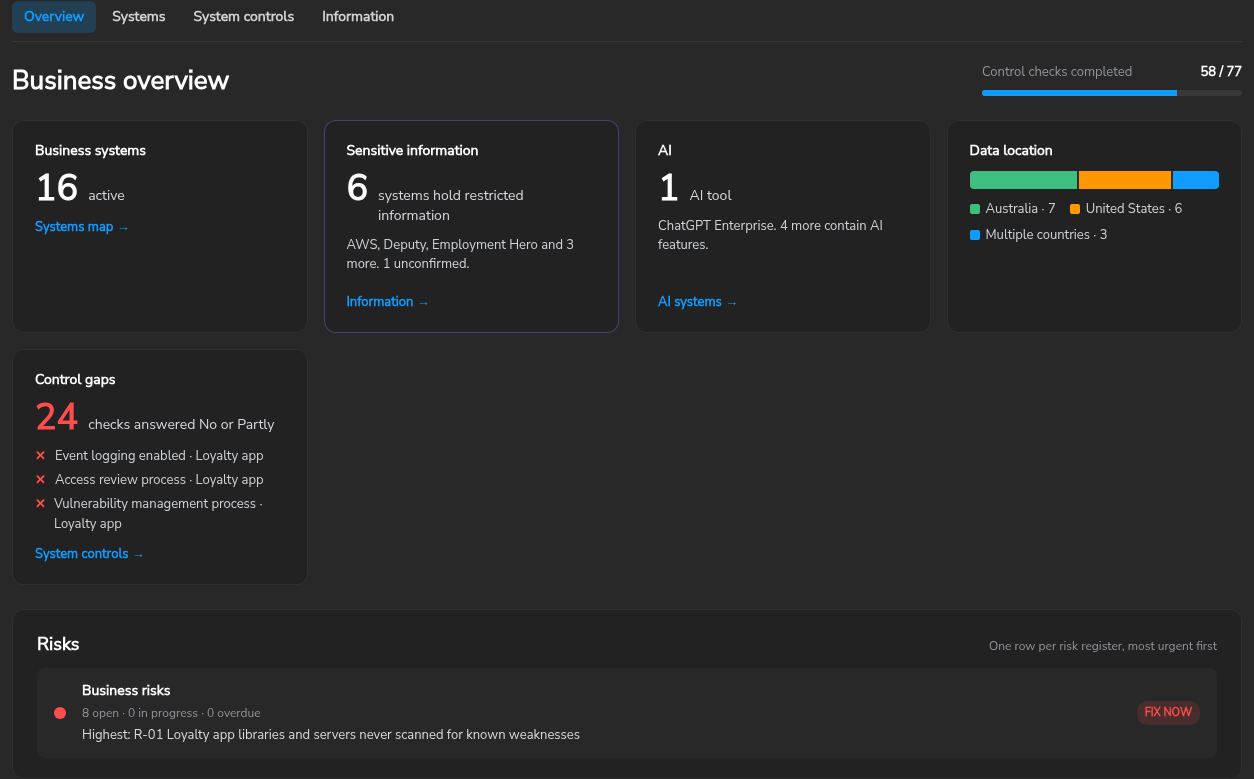
The Business view is the plain-language part of Governance. It records the business systems an organisation uses, the information each one holds, six security controls checked on every system, and a register of business risks. It opens first under Governance and is written for business owners rather than engineers.
The screenshots on this page show a fictional retailer, Northwind Outdoor, with 14 stores, an online store and 250 staff.
For framework registers such as ISO 27001 and PCI DSS, see the Governance & Compliance Management guide.
Set up
The Overview shows a set-up card until the organisation has its three registers. Set up creates all three from Secure60 templates:
| Register | Purpose |
|---|---|
| Discovery | Questions about the business, and the systems and information it holds, answered in the customer’s own words |
| System controls | Six controls checked on every business system |
| Business risks | Risks raised against a system, a control gap or a type of information |
Advanced lists the templates available to the organisation for the discovery and System controls registers.
Discovery
The discovery register is a notebook. Each section ends in an empty row: type a title, press Tab to add details, and press Enter to save. Pasting several lines offers to add them as separate items.
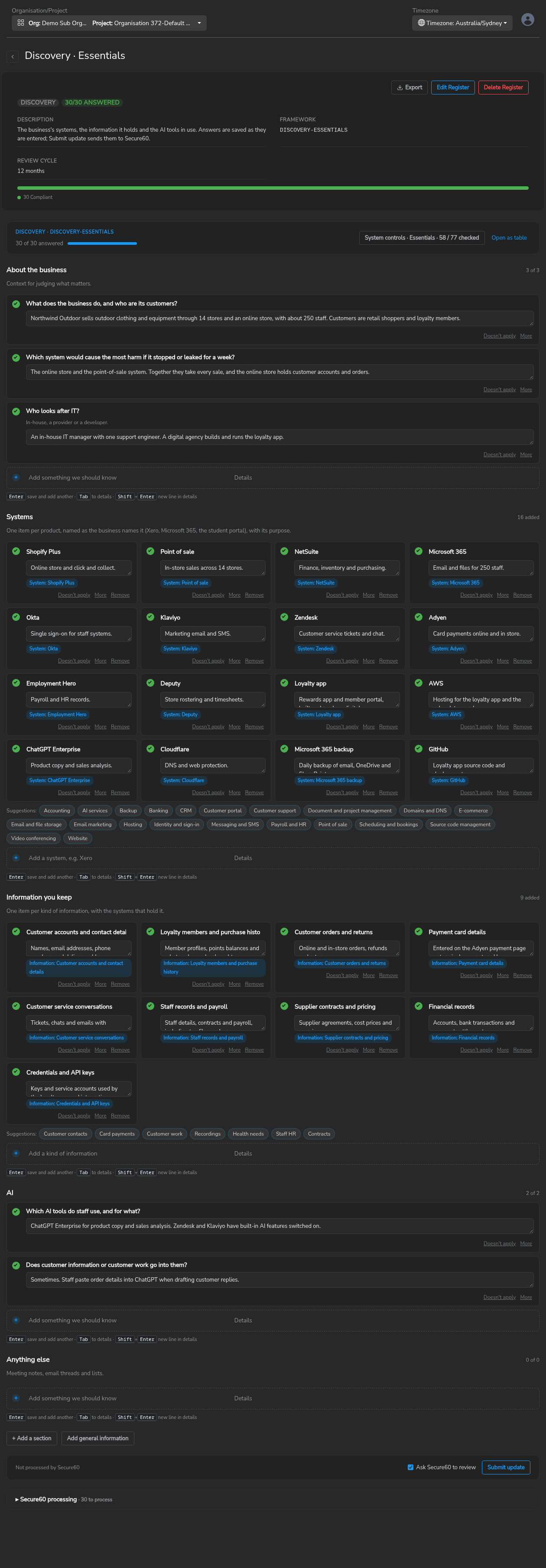
| Section | Becomes |
|---|---|
| About the business, AI | Answers only |
| Systems | One business system per item |
| Information you keep | One information record per item |
| Anything else | Notes only |
Submit update turns the Systems and Information items into records. It matches existing records by name, so submitting again never creates duplicates. Ask Secure60 to review notifies Secure60 that the answers have changed.
Systems
The Systems map groups business systems into six columns: Communication and collaboration, Sales and marketing, Service delivery, Finance and administration, AI, and IT infrastructure. A system’s category decides its column; categories can be renamed, hidden or moved to another column from the Categories view.
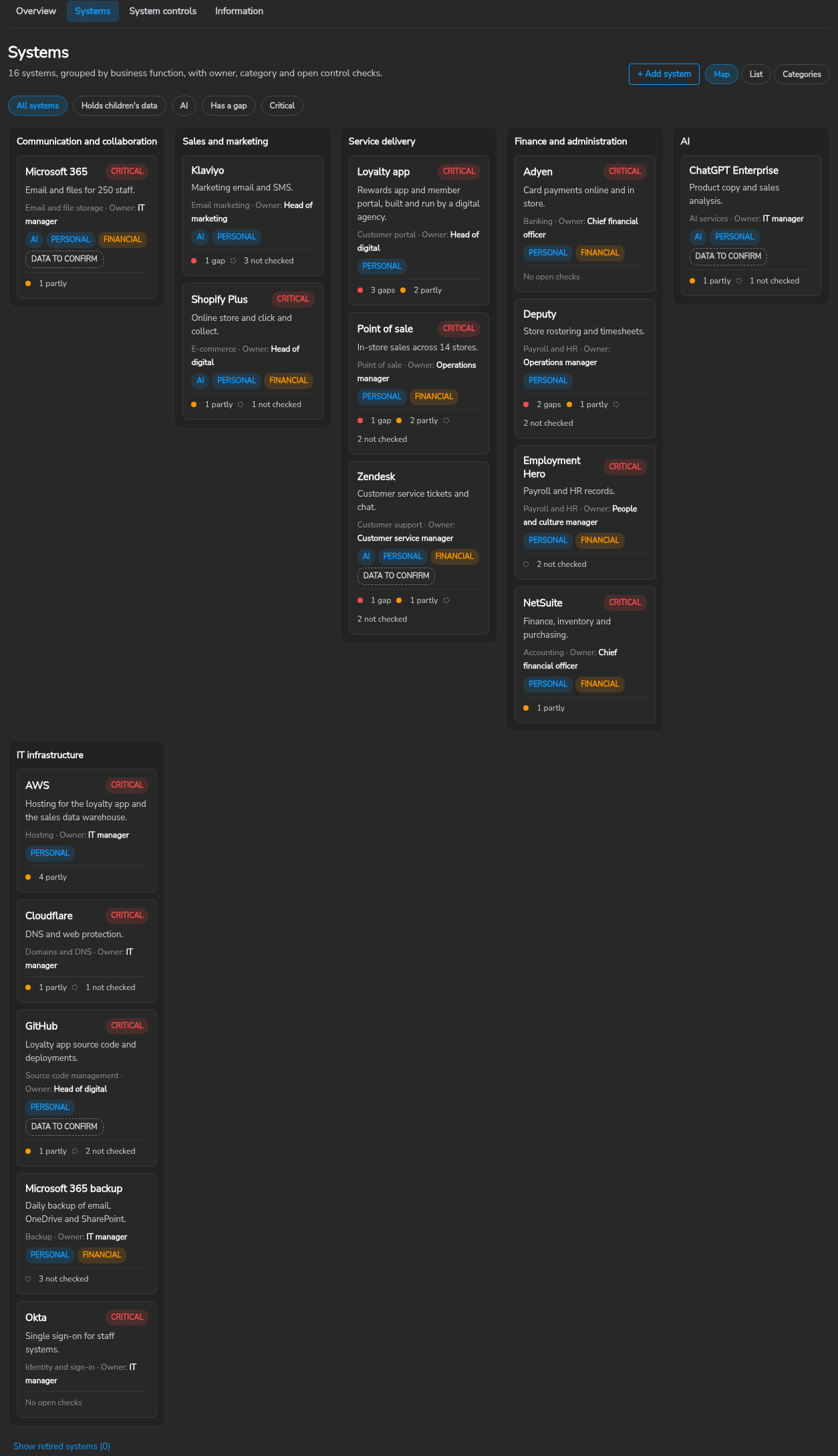
Each system records eight facts: name, purpose, category, business owner, AI use, data location, whether it is critical, and status. Filters show systems that hold children’s data, AI systems, systems with a control gap and critical systems.
- AI. AI tool lists the system in AI Activity. Contains AI features marks a system with built-in AI.
- Retire. A system that is no longer used is retired rather than deleted. Its history and control answers return if it is restored.
System controls
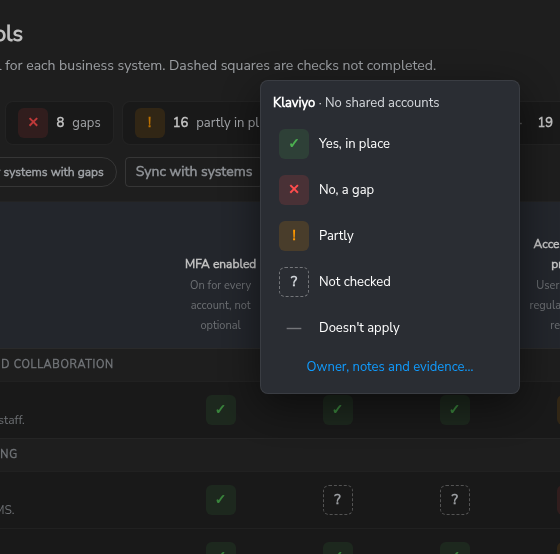
The System controls grid checks six controls on every business system. A cell is answered Yes, Partly, No, Not checked or Doesn’t apply.
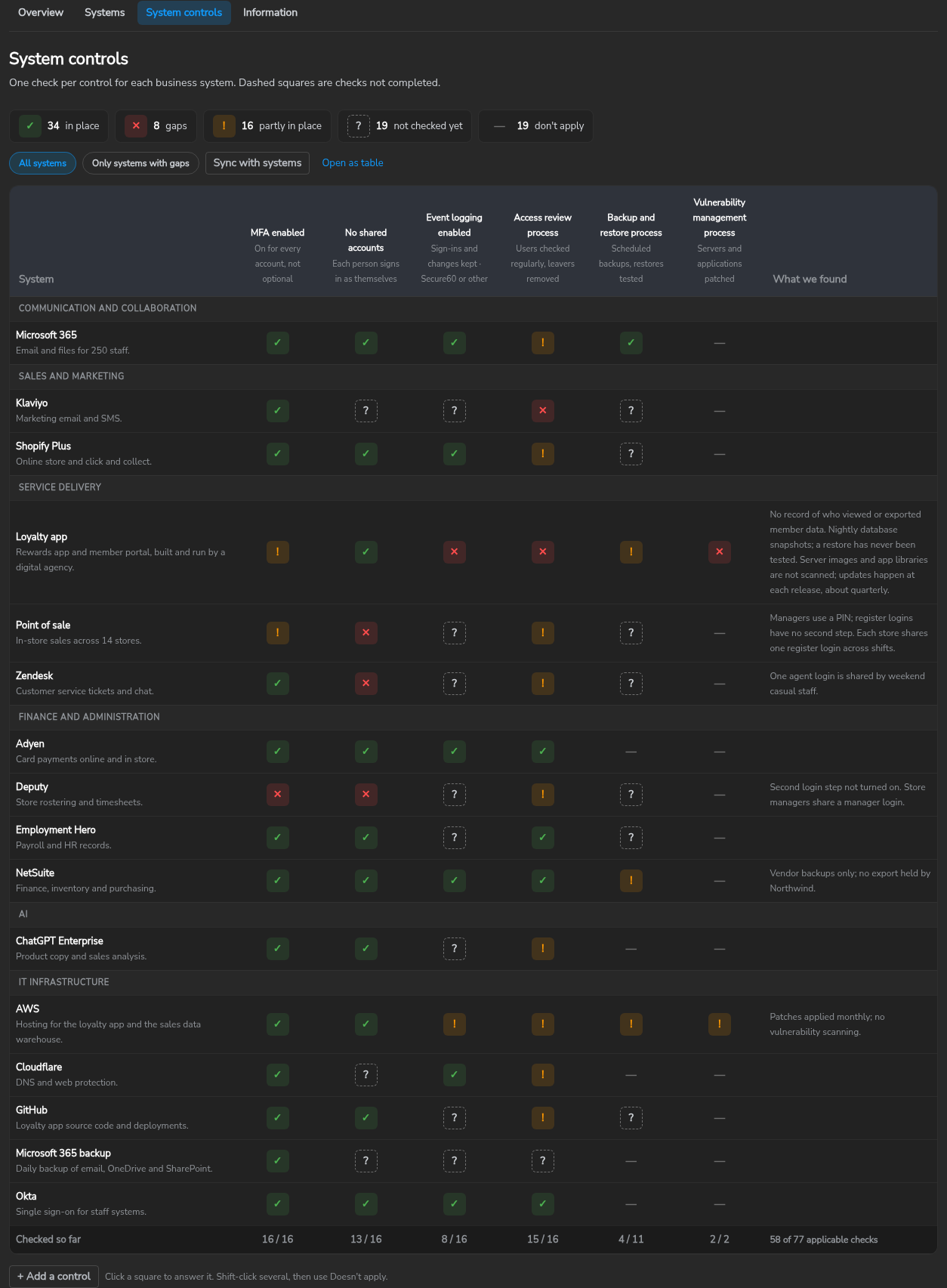
| Control | Yes | Partly | No |
|---|---|---|---|
| MFA enabled | Enforced for every account by authenticator app, passkey or security key | Optional, on for some accounts, or SMS codes only | Password only |
| No shared accounts | One account per person; emergency logins kept in the password manager | A login used by more than one person, or business work in personal accounts | |
| Event logging enabled | Sign-ins and admin changes kept for 12 months outside the system and reviewed, by Secure60 or another service | The vendor’s built-in log only, with short retention or no review | Nothing recorded |
| Access review process | Users checked at least each quarter; leavers removed on their last day | Leavers removed when someone remembers | No user list and no leaver step |
| Backup and restore process | Backups that an attacker cannot delete, and a restore tested in the last 12 months | Backups run, restore not tested | No backup |
| Vulnerability management process | Supported versions only; servers, applications and plugins patched on a set timeframe or automatically, and scanned | Patched, but late or irregular | Software past end of support, or patches months apart |
Four of the six are processes: a Yes requires a process that runs on a schedule and leaves evidence. Vulnerability management applies to systems the organisation runs itself; for software-as-a-service products the vendor patches, the answer is Doesn’t apply.
The controls follow ASD Essentials (Australian Signals Directorate, October 2026): MFA enabled to IT.PRO-13.4, No shared accounts to IT.PRO-13.6, Event logging enabled to IT.DET-01, Access review process to IT.PRO-12.1 and IT.PRO-13.1, Backup and restore process to IT.PRO-10.1 to 10.3, and Vulnerability management process to IT.PRO-06.1 to 06.3 and IT.GOV-14.1.
Click a cell to answer it. Owner, notes and evidence opens the full control record for notes, an owner, attachments, exceptions and reviews.
Information
The Information tab lists the types of information the organisation holds, with a classification of Public, Internal, Confidential or Restricted, and any sensitive data types. Children’s data, health information, government identifiers and credentials make a record Restricted; any other sensitive type makes it at least Confidential.
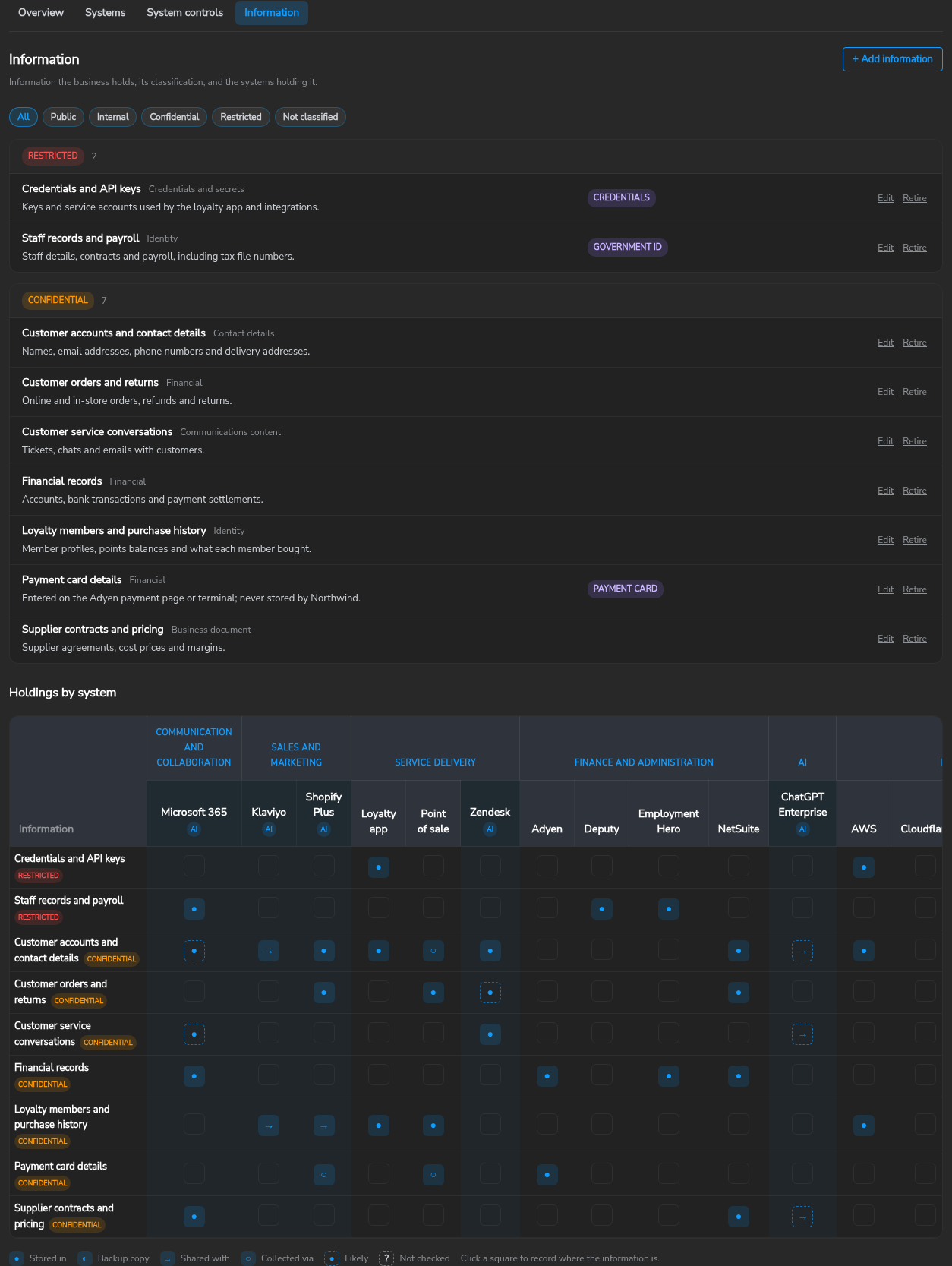
The holdings matrix shows which systems hold each type of information and how: collected via, stored in, backup copy or shared with. A dashed square marks a holding that is likely but not yet confirmed. Each information record’s page lists the systems holding it, the countries involved and the risks raised against it, and can send open questions to the customer as a questionnaire.
Business risks
Risks are added from a system, a control gap or an information record with Add risk. Each risk has a title, a priority (Fix now, Fix next or Monitor), a description and an optional due date. The Overview shows each risk register with its open, in-progress and overdue counts and its highest-priority open risk.
Updating the Business view with an agent
Agents and integrations update the Business view through the Secure60 API or the Secure60 MCP server at https://mcp.secure60.io/mcp, which exposes the API as tools and takes the same API token in an Authorization: Bearer header.
The API definition carries the rules an agent follows when it writes records, under Agent guide in its introduction. Through the MCP server, the get_agent_guide tool returns them: topic rules for the rules that apply everywhere, and topic business-view for the Business view records, fields and control definitions. The rules that matter most:
- Every request names the organisation that owns the project (
organisation_id). - An entity’s
contextis stored as one object, so an update sends the full, mergedcontext. - Systems and information are retired, not deleted.
- The agent shows the proposed changes and waits for approval before it writes, then reads the records back.
 Back to top